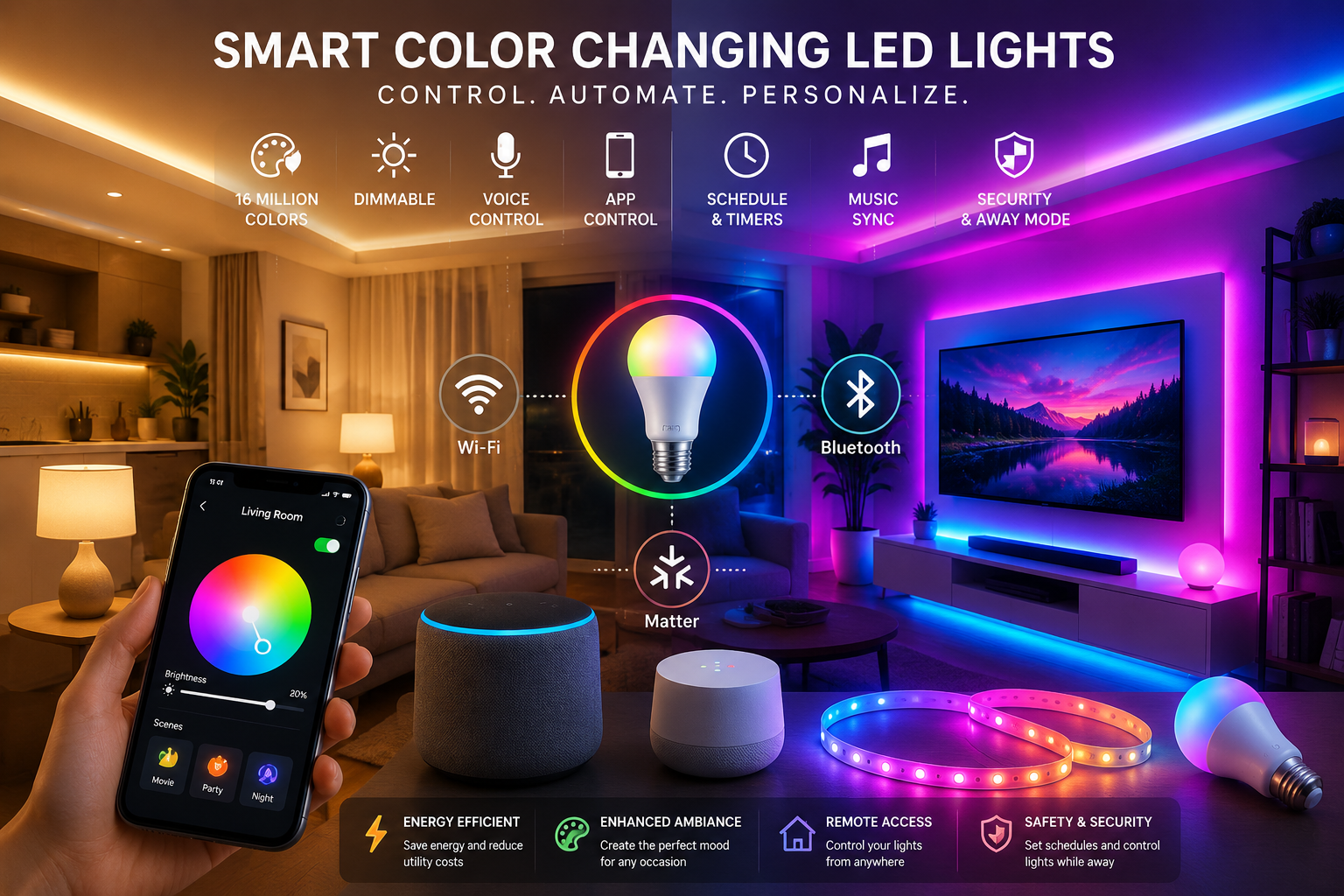
Smart LED lights have moved far beyond simple on-and-off bulbs. Today, WiFi LED lights, color changing LED lights, and other smart LED lights can shift colors, dim on command, sync with music, and respond to voice assistants or mobile apps. That shift has made modern lighting feel less like a utility and more like a flexible part of daily life. The U.S. Department of Energy notes that LEDs can use at least 75 percent less energy and last up to 25 times longer than incandescent bulbs, which helps explain why smart lighting is becoming such a popular upgrade.
What makes this category especially interesting is the mix of convenience and control. You are no longer limited to one fixed white tone or one switch on the wall. With the right smart lighting systems, you can create custom scenes for work, relaxation, gaming, guests, or security, then automate them so they run in the background. That is the real appeal: lighting that feels responsive, personal, and efficient instead of static and forgettable.
Want to learn more about color-changing lighting technology? Check out our comprehensive Color Changing LED Lights Guide, which covers RGB, RGBW, smart controls, installation tips, and real-world applications for homes, events, and commercial spaces.
What Are Smart Color Changing LED Lights?
Smart color changing LED lights are LED-based fixtures or bulbs that can be controlled digitally instead of relying only on a physical switch. They usually support app control, voice control, scheduling, dimming, and in many cases a full range of colors or tunable white tones. Brands such as Philips Hue, GE Cync, TP-Link Kasa, LIFX, and WiZ all show how the market has matured: some products offer white, white ambiance, and full color modes, while others add schedules, grouping, or no-hub Wi-Fi control.
Traditional LED lights can already save energy, but smart versions add intelligence on top of that efficiency. In practice, that means you can dim a lamp from your phone, change a bedroom from cool white to warm amber before sleep, or switch a retail display from neutral white to a dramatic color scene for a product launch. Some systems rely on RGB or RGBW technology, which allows them to blend colors and produce richer visual effects than a basic single-color LED setup. Philips Hue, for example, positions its bulbs across White, White ambiance, and White and color ambiance ranges, while other brands highlight millions of colors and white-temperature control.
How Smart LED Lights Work
Smart lighting is built on a simple idea: the light contains electronics that let it listen for commands and respond in real time. Philips Hue explains that smart bulbs contain microchips that communicate through Bluetooth, Wi-Fi, or Zigbee networks, and once connected through a hub or bridge, they can react quickly to commands and automate routines. That communication layer is what turns a normal bulb into a connected device. Instead of a direct physical circuit doing all the work, the bulb becomes part of a small digital system.
LED Technology
At the heart of the system is LED technology itself. LEDs are efficient solid-state light sources, and the U.S. Department of Energy says they use at least 75 percent less energy than incandescent lighting and last much longer. That matters because smart features only make sense when the base lighting technology is already efficient. In other words, the “smart” part sits on top of a platform that is already designed to waste less energy and produce less heat.
“use at least 75 percent less energy”
Connectivity Options
Smart lights usually connect through one of three common paths: Wi-Fi, Bluetooth, or a hub-based system such as Zigbee or Matter. Wi-Fi lights talk to your home network and are often built for remote access, while Bluetooth lights are usually easier to set up and control locally from a nearby phone. Hub-based systems can add stability and broader ecosystem support, especially in larger smart homes or commercial environments.
That connection choice shapes the entire experience. A Wi-Fi light may give you app control from anywhere and deeper integrations with your home platform, while Bluetooth can be ideal for simple rooms, quick setups, and users who want less hardware in the chain. Matter is also changing the picture by making smart home devices work across ecosystems more easily, using familiar technologies such as Bluetooth Low Energy for setup and Wi-Fi, Thread, or Ethernet for connectivity.
What Are WiFi LED Lights?
WiFi LED lights are smart lights that connect directly to your home network through a router. Once connected, they can usually be managed through a mobile app, a cloud service, or a smart home platform without needing a separate bridge. Products from WiZ and LIFX make this approach very clear: they advertise Wi-Fi connection, app control, and no extra hub or gateway. That makes them especially attractive to beginners who want smart lighting without adding more boxes to the setup.
The biggest advantage is remote access. If the lights are on your network, you can often control them while away from home, set schedules, or trigger automations based on time or routines. Some Wi-Fi models also support Matter, which helps them integrate with major smart home ecosystems more smoothly. In practical terms, Wi-Fi LED lights are a strong fit for users who want broad control, app-based convenience, and the option to expand the system later.
WiFi LED Lights vs Bluetooth LED Lights
The biggest difference between Wi-Fi and Bluetooth lighting is not just the connection method; it is the way the whole system behaves. Wi-Fi lights are designed around your home network, which usually means remote control, cloud features, and stronger ecosystem integration. Bluetooth lights are generally more local, and Bluetooth itself is built with flexible range options that can vary depending on the system design and environment. Philips Hue’s Bluetooth-enabled bulbs also highlight instant control via Bluetooth, which makes them easy to use straight out of the box.
| Feature | WiFi LED Lights | Bluetooth LED Lights |
| Range | Works through your home network and router | Usually controlled locally from nearby devices |
| Internet Access | Often supports cloud and remote control | Typically local control first |
| Remote Control | Yes, commonly from anywhere | Usually limited unless paired with a hub or bridge |
| Setup Complexity | Moderate, but often no hub is needed | Usually simple and fast |
| Smart Home Integration | Strong, especially with Matter and assistants | Good, but often more limited without a bridge |
| Reliability | Strong when Wi-Fi is stable | Great for simple local control, but more device-dependent |
Wi-Fi lights are best when you want full-home automation, away-from-home access, and a system that can grow with your smart home. Bluetooth lights are often best for smaller spaces, renters, dorm rooms, or people who want quick setup and straightforward control without depending on the router for everything. In many homes, the smartest answer is not choosing one forever; it is choosing the connection type that matches the room and the purpose.
Key Features of Smart Color Changing LED Lights
Color and Brightness Control
The obvious star feature is color control, but brightness control is just as important. Brands such as GE Cync, Kasa, and Philips Hue offer products that let users shift between colors, adjust brightness, and tune white temperature for different moods or tasks. This is what makes smart lighting useful in real life, not just entertaining on a product page. You can brighten a workspace for focus, soften a lamp for movie night, or warm up a dining area so the room feels more inviting.
Scenes, Timers, and Music Sync
Scenes and timers turn a light into a behavior-driven tool. Kasa supports schedules and grouping, GE Cync includes schedules, and LIFX describes schedules and automations that adapt to daily routines. On the entertainment side, some ecosystems even support music synchronization. SmartThings recently highlighted Music Sync, which connects lighting directly to music so the lights move in real time with what is playing. That makes the feature feel less like decoration and more like part of the experience.
Group Control and Automation
Group control is one of those features people only miss after they have it. Instead of changing each bulb one by one, you can manage a whole room, floor, or zone together. Google Home says you can control over 50,000 smart home devices in its app, including lights, and it supports automations for scheduling and multiple-light control. Apple’s Home app similarly supports scenes like “Good night” to turn off lights, while SmartThings emphasizes lighting control for brightness, color, and mood.
Voice Control and Smart Home Integration
Voice control is where smart lighting starts to feel invisible in the best way. Alexa supports smart lights through voice and automation routines, Google Assistant and Google Home support lights through voice commands and automations, Apple’s Home app works with HomeKit and Matter accessories, and SmartThings positions smart lighting as part of a broader connected home ecosystem. Each platform has its own strengths, but the common thread is simple: the light responds to your voice, your schedule, or your scene instead of forcing you to hunt for a wall switch.
A useful way to think about integration is that the lighting becomes one layer of a larger home routine. You might say “Good night” and have the lights fade off, doors lock, and motion sensors arm. Or you might trigger a “Movie time” scene that dims the living room and changes the color temperature to something softer. The point is not just convenience; it is consistency. Once the routine is built, the home starts behaving the way you want it to.
“a unifying, IP-based connectivity protocol”
Benefits of Smart LED Lights
Convenience
Convenience is the first reason most people buy smart lights, and it is a strong one. You can change brightness from bed, switch the room color without getting up, or turn every light off after you already left the house. For families, that can mean fewer late-night trips downstairs. For offices or businesses, it can mean less friction during opening and closing routines. Once the system is set up, lighting starts acting like a helpful assistant instead of a manual chore.
Energy Efficiency
Energy efficiency is the second major benefit, and it is more than a nice bonus. LEDs already use far less energy than incandescent bulbs, and smart controls can reduce waste even further by letting you dim lights, schedule them, and avoid unnecessary use. The U.S. Department of Energy’s LED guidance is clear about the savings potential, and that efficiency makes smart lighting especially appealing in homes, offices, retail spaces, and hospitality settings where many lights run for many hours every day.
Enhanced Ambiance
Smart color changing lights are powerful because they shape mood, not just visibility. A cool white setting may feel crisp and productive, while a warm amber tone can make a room feel calmer and more relaxed. Full-color lighting can also bring personality to gaming rooms, parties, and product displays. This is why brands like Philips Hue, GE Cync, and LIFX talk so much about mood, color blending, and expressive scenes. The technology is doing emotional work, not just technical work.
Security Benefits
Lighting is also a quiet security tool. Schedules and away-from-home controls can make a house look occupied, and motion-triggered lighting can improve visibility around entrances, driveways, and hallways. WiZ explicitly notes that you can control lights while away from home and automate schedules, which is exactly the kind of feature that helps support a security-first routine. Smart lighting will not replace a full security system, but it can add a useful layer of visibility and deterrence.
Remote Accessibility
Remote control is one of the most useful features for busy households and multi-location businesses. If you forget to turn something off, you can usually do it from your phone. If a store wants to prep its front window before opening, the lights can be activated before staff arrive. Google Home, Apple Home, and Matter-enabled platforms all emphasize control from home or away, which is why remote accessibility has become a standard expectation rather than a luxury feature.
Personalization
Personalization is where smart lighting feels truly modern. You can build a “wake up” scene, a “focus” scene, a “relax” scene, or a “party” scene and save it for later. Philips Hue’s color and ambiance ranges, LIFX’s billions of colors, and Kasa’s multicolor bulbs all show how much room there is for individual taste. The result is a lighting setup that feels tailored to the person using the room, not just the room itself.
Popular Types of Smart Color Changing LED Lights
Smart LED Bulbs
Smart bulbs are the easiest entry point for most people. You screw them into existing fixtures, connect them to an app, and start experimenting with brightness and color. Philips Hue, GE Cync, Kasa, and LIFX all offer bulb-based options, and many of them support schedules, voice control, and color scenes. This is the right category for renters, beginners, and anyone who wants fast results without rewiring a room.
Smart LED Strip Lights
LED strip lights are the creative category. They work well behind TVs, under cabinets, along shelves, and around architectural edges where indirect light makes the biggest visual impact. WiZ and GE Cync both show strip-style products as part of their smart lighting ranges, and LIFX also leans into bold color effects and zone-based lighting. If bulbs are the practical choice, strips are the atmosphere choice.
Smart Light Panels
Light panels are built more for design than replacement lighting. They are often used as wall art, gaming decor, or accent lighting in content studios. Their purpose is not only to illuminate a room but to become part of the room’s visual identity. In practice, they are popular with people who want lighting that acts like a statement piece.
Outdoor Smart LED Lights
Outdoor smart lights bring color control and automation outside the house. WiZ’s outdoor RGBW strip kit, for example, is designed for gardens, walkways, porches, and terraces, and it is built around weatherproof smart control. Outdoor lighting adds curb appeal, safety, and seasonal decoration in one system. That makes it valuable for homeowners and venues alike.
Commercial Smart Lighting Systems
Commercial systems are where smart lighting becomes operational infrastructure. Bluetooth Networked Lighting Control is positioned by Bluetooth SIG as a full-stack standard for wireless lighting control in commercial settings, while the CSA highlights smart lighting as one of the initial Matter-supported categories. In stores, hotels, offices, event spaces, and stadiums, lighting is not just aesthetic; it affects energy use, customer experience, and operational flexibility.
Best Applications for Smart LED Lighting
Smart lighting adapts differently depending on the room. In bedrooms, it is useful for wake-up routines, warm evening scenes, and nighttime dimming. In living rooms, it helps with movie night, reading, hosting, and everyday comfort. Gaming rooms and home theaters benefit from color scenes and bias lighting, while retail stores and restaurants can use smart lighting to shape atmosphere, highlight products, and create a more memorable brand feel.
Hotels, event spaces, and commercial venues have even more to gain because lighting changes can support different activities throughout the day. A breakfast room may need bright neutral light in the morning and softer tones at night. An event hall may want fast scene changes for speeches, presentations, and performances. Smart lighting makes that kind of flexibility practical because the system can store scenes, apply schedules, and respond instantly when the environment changes.
How to Choose the Right Smart LED Lights
The right choice starts with the room, not the brand. A small bedroom may only need a pair of smart bulbs, while a living room or commercial space might benefit from strip lights, panels, or a broader lighting system. Brightness matters too, because a decorative accent light is not the same thing as a main source of illumination. Then comes compatibility: check whether the lights work with Alexa, Google Home, Apple Home, SmartThings, or Matter before you buy.
A simple buyer’s checklist can help keep the decision grounded:
- Room size: small accent space or full-room lighting
- Connection type: Wi-Fi, Bluetooth, or hub-based
- Ecosystem support: Alexa, Google, Apple, SmartThings, Matter
- Light quality: brightness, color range, and white temperature
- Installation: screw-in bulb, strip, panel, or fixture replacement
- Budget: entry-level convenience or premium whole-home control
If the goal is simplicity, start with a smart bulb or a no-hub Wi-Fi product. If the goal is a larger ecosystem or room-wide automation, look for Matter support, grouping, and stronger assistant integration. The best smart light is not the one with the most features on the box; it is the one that fits how you actually live.
Installation and Setup Guide
Setting up smart LED lights is usually straightforward. First, choose the right location and make sure the fixture type matches the bulb, strip, or panel you bought. Next, install the light and connect it to power. After that, download the brand’s mobile app, create or sign into your account, and follow the pairing process. For many Wi-Fi lights, the app will ask you to connect the device to your home network before you begin using scenes, schedules, or voice control.
Once the light is connected, name it clearly by room or function. That sounds small, but it saves a lot of confusion later, especially when you add more devices. Then create a few basic scenes first, such as “Bright,” “Relax,” and “Night,” and test them for a few days before building more complex automations. The smoother the first setup, the less likely you are to abandon the smart features and treat the light like a normal bulb.
Common Problems and Troubleshooting
Most smart lighting issues come down to pairing, network quality, or app permissions. If a Wi-Fi light will not connect, the home network may be on the wrong band, the password may be incorrect, or the device may be too far from the router during setup. If a Bluetooth light seems unresponsive, closing and reopening the app or moving the phone closer may help. When the issue is app-based rather than hardware-based, checking for firmware updates and re-syncing the device can solve a surprising number of problems.
Automation failures are often simpler than they look. A routine may not run because the device name changed, the scene was edited, or the platform lost sync with the accessory. In that case, rechecking the light inside the home app, assistant, or vendor app usually reveals the mismatch. The key is to think of smart lighting like a small network, not a single switch. When one part of the chain is broken, the whole experience can feel broken even though the bulb itself is fine.
Future of Smart LED Lighting
The future of smart LED lighting is moving toward deeper automation, better interoperability, and more context-aware behavior. Matter is a big part of that shift because it is designed as a unifying, IP-based connectivity protocol for the smart home, and CSA has continued expanding support for lighting-related controls and scenes. In 2025, CSA said Matter 1.4.2 made scene support certifiable, allowing rooms or environments to be controlled with a single command. That matters because lighting is no longer just about turning on a bulb; it is becoming part of a larger system that can understand the entire room at once.
AI-powered lighting will likely take that even further by learning routines, adjusting scenes automatically, and responding to time of day, presence, and activity. Google Home already emphasizes automations and home/away control, while Bluetooth SIG has continued to develop lighting-control standards for commercial spaces. Add energy reporting, smarter building integration, and more reliable interoperability, and the next generation of smart lighting starts to look less like a gadget and more like a service layer for homes and buildings.
Conclusion
Smart color changing LED lights are popular for a reason: they combine efficiency, convenience, and customization in a way that traditional lighting simply cannot match. Whether you choose smart LED lights with Wi-Fi, Bluetooth, or Matter support, you gain more control over mood, automation, and energy use. That is why these lights work so well in homes, offices, stores, restaurants, hotels, and event spaces. The right system can make a room feel calmer, brighter, safer, or more dramatic with just a few taps.
The best part is that smart lighting keeps getting better. Current products already support voice commands, schedules, scenes, and app control, while newer standards are making setup and interoperability easier than ever. If you are building out a connected home, smart lighting is one of the simplest places to start because the upgrade is visible immediately. It is practical, it is flexible, and it is one of the few tech purchases that improves both daily comfort and long-term efficiency.
Frequently Asked Questions
1. What are smart LED lights?
Smart LED lights are connected lighting products that can be controlled through an app, voice assistant, schedule, or automation instead of only a wall switch. Many support brightness changes, color changes, and scene settings.
2. How do WiFi LED lights work?
Wi-Fi LED lights connect to your home router and then communicate with a mobile app or cloud service. That makes remote control, scheduling, and smart home integration much easier. Some Wi-Fi products also support Matter for broader compatibility.
3. Are smart LED lights worth it?
Yes, for most users they are worth it because they add convenience, automation, and custom lighting scenes while still benefiting from LED efficiency. The value is especially strong if you care about energy savings, voice control, or mood-based lighting.
4. Can I control smart lights when I am away from home?
Often yes, especially with Wi-Fi or Matter-enabled products that support remote access through an app or smart home platform. Brands such as WiZ and Google Home explicitly support away-from-home control.
5. What is the difference between WiFi and Bluetooth LED lights?
Wi-Fi lights usually offer broader remote access and stronger cloud or ecosystem features, while Bluetooth lights are often simpler and more local to set up and use. Bluetooth can be great for nearby control, but Wi-Fi is usually better for whole-home automation.