Introduction
Modern RGB lighting systems are surprisingly sophisticated. A simple LED strip sitting behind your television or gaming desk actually depends on multiple components working together: red, green, and blue color channels, a controller, stable power delivery, firmware, and communication signals. If even one of those elements fails, your lighting setup may suddenly become stuck on red, refuse to switch colors, or display shades that look completely wrong.
These LED color issues are frustrating, but they rarely mean your entire lighting system is dead. In fact, most situations involving LED lights won’t change colors, RGB LED lights not changing color, or strange color behavior can be fixed in less than thirty minutes with a systematic troubleshooting process.
This guide walks through every major cause of Color Changing LED Lights, explains why they happen, and provides practical repair steps used by professional installers and lighting technicians.
Signs Your LED Lights Have Color Problems
RGB lighting failures rarely appear without warning signs. The pattern of failure often points directly toward the faulty component if you know what to look for.
Common symptoms include:
- Lights stuck permanently on white, red, green, or blue.
- Remote changes brightness but refuses to change colors.
- Mobile application connects successfully but color commands fail.
- Some sections of the strip change color while others stay frozen.
- Colors appear incorrect, such as purple appearing blue.
- Delayed color changes or flashing between random colors.
- Only one color channel is missing.
- Smart home voice commands work for power but not color adjustments.
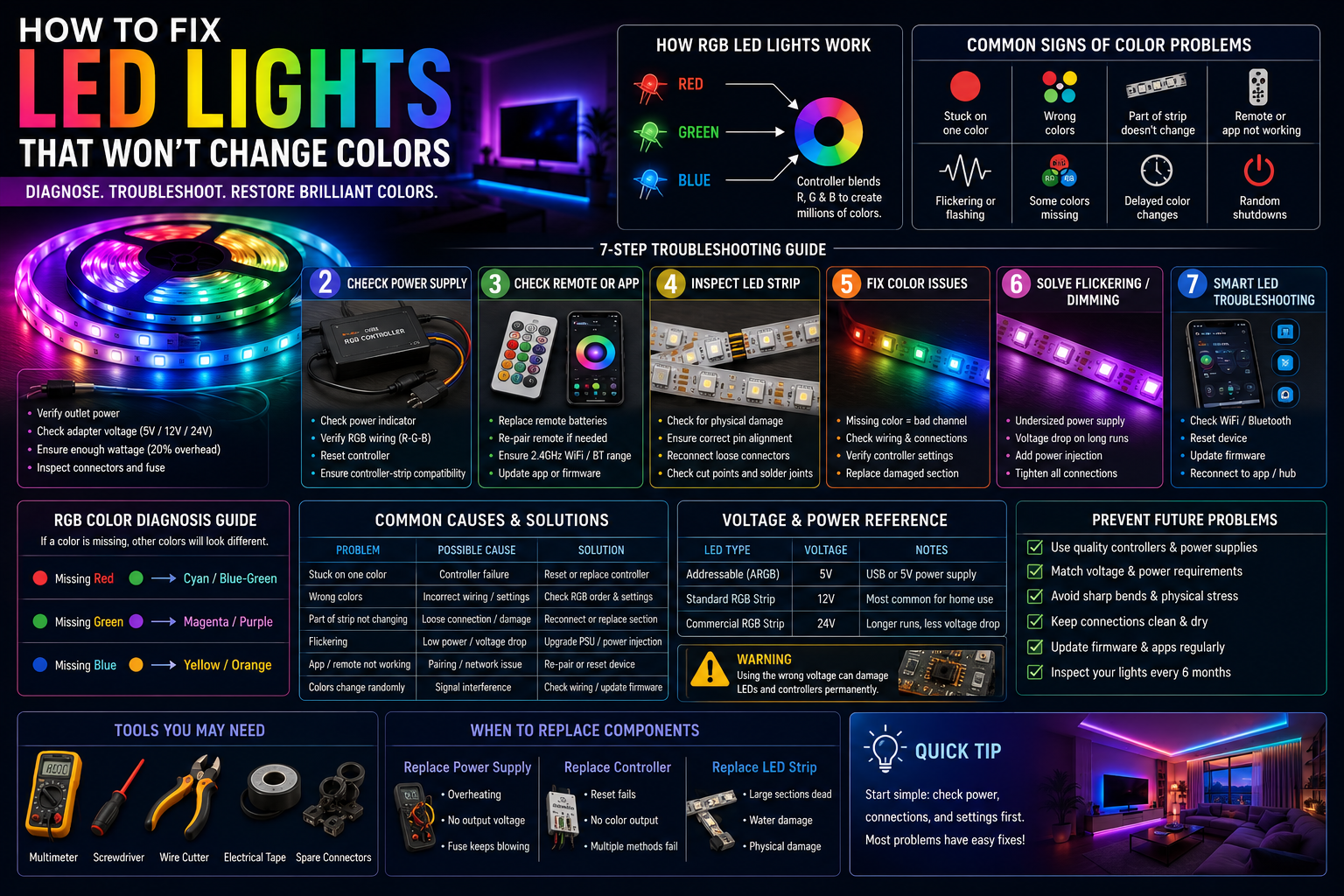
A missing red channel often causes cyan or blue-green colors to appear instead of warm shades, while a missing blue channel typically creates yellow or orange tones. This diagnostic pattern is frequently used by technicians because color failures tend to reveal exactly which circuit has failed.
How RGB LED Lights Produce Colors
Red, Green, and Blue Color Channels
RGB lighting works much like a painter mixing three basic colors on a palette. Every LED package contains separate red, green, and blue emitters. By adjusting brightness levels across these three channels, the controller creates millions of possible color combinations.
If one channel fails, the entire color spectrum changes. Remove red and purple becomes blue. Remove green and yellow becomes red-orange. Understanding this relationship helps narrow down faults immediately.
RGB Controllers
The controller acts as the brain of the lighting system. It receives commands from remotes, mobile apps, WiFi hubs, Bluetooth connections, or smart home assistants and converts those instructions into electrical signals for the strip.
A faulty controller may still power the LEDs while losing the ability to switch color channels. This is one of the most common causes of LED controller problems and often explains why lights remain stuck on a single color.
LED Drivers and Power Delivery
Color generation depends on stable voltage. RGB strips usually operate on 5V, 12V, or 24V systems. Supplying incorrect voltage can lead to flickering, incorrect colors, or permanent damage.
Signal Transmission
Addressable LEDs rely on digital data signals traveling from the controller to every individual LED chip. If the signal becomes interrupted due to cable damage, loose connectors, or interference, colors may freeze or behave unpredictably.
Step 1: Check the Remote Control or Mobile App
Start with the easiest fixes first.
Replace Remote Batteries
Weak batteries reduce signal strength long before they completely die. If brightness changes work but color commands fail, battery replacement should be your first step.
Re-Pair the Remote
Many controllers require pairing after power outages or resets.
- Disconnect power for 30 seconds.
- Restore power.
- Hold the pairing button for five seconds.
- Wait for confirmation flashes.
Verify App Connection
Bluetooth devices should remain within close range during setup. WiFi controllers must operate on compatible networks, usually 2.4 GHz rather than 5 GHz.
Update the App
Outdated software causes compatibility problems surprisingly often. Several smart lighting ecosystems have experienced firmware-related color issues requiring updates or resets.
Reset the Controller
Most controllers include a reset button or require holding the power button for ten seconds.
This simple step resolves a huge percentage of smart LED color problems.
Step 2: Inspect the RGB Controller
The controller is the number one suspect whenever power exists but colors refuse to change.
Loose Controller Connections
Inspect every terminal connection carefully.
Look for:
- Partially inserted wires.
- Bent connector pins.
- Corrosion.
- Heat discoloration.
Controller Reset
Perform a factory reset according to manufacturer instructions.
Resetting clears corrupted memory settings and restores communication between the controller and LEDs.
Incorrect Controller Settings
Some controllers support RGB, RGBW, RGBCCT, and addressable strips simultaneously.
Using RGBW settings on standard RGB strips often causes bizarre color behavior and mismatched outputs.
Controller Compatibility
A 5V addressable strip cannot communicate correctly with a standard 12V RGB controller.
Compatibility mistakes remain one of the leading installation errors seen by technicians.
Step 3: Check LED Strip Connections
Loose Connectors
Connector failures frequently occur near bends, corners, and furniture edges.
Even slight movement can interrupt a single color channel.
Incorrect Pin Alignment
RGB strips use four-pin connectors:
- +12V
- Red
- Green
- Blue
If alignment shifts by even one pin, colors become completely incorrect.
Damaged Connectors
Cheap clip connectors often loosen over time.
Professional installers typically prefer soldered joints because they provide lower resistance and greater long-term reliability.
Broken Solder Joints
Microscopic cracks inside solder joints can create intermittent failures.
Wiggling the strip gently while observing color changes can reveal these hidden defects.
Step 4: Inspect the Power Supply
Power problems create some of the strangest symptoms in RGB systems.
Voltage Compatibility
Always verify voltage ratings.
| LED Type | Required Voltage |
| Addressable ARGB | 5V |
| Standard RGB Strip | 12V |
| Commercial RGB Strip | 24V |
Using incorrect voltage can destroy LEDs instantly or prevent proper color production.
Insufficient Power
Power supplies should include at least 20% extra capacity beyond calculated load requirements.
Underpowered systems often display:
- Flickering
- Slow transitions
- Incorrect colors
- Random resets
Loose Wiring
Loose positive or negative terminals increase resistance and reduce current delivery.
Power Supply Failure
Voltage drops become especially noticeable at the end of long strips where colors appear duller or shift unexpectedly.
Step 5: Identify Damaged LED Sections
Burned-Out LEDs
A single failed LED in addressable strips can interrupt communication with every LED after it.
Water Damage
Moisture causes corrosion on exposed copper pads and controller terminals.
Physical Damage
Furniture pressure, sharp bends, and accidental impacts commonly damage internal traces.
Incorrect Strip Cutting
LED strips should only be cut at marked locations.
Improper cuts frequently destroy entire segments and create permanent LED wiring problems.
Step 6: Fix Smart LED Color Problems
Bluetooth Connectivity Issues
Bluetooth controllers suffer from interference caused by walls, televisions, and metal surfaces.
Move the phone within a few feet during troubleshooting.
WiFi Connection Problems
Most RGB controllers still require 2.4 GHz networks.
Mesh systems sometimes isolate smart devices on separate virtual networks, preventing communication.
Firmware Updates
Firmware updates often resolve communication bugs, pairing issues, and color synchronization errors. They can also introduce problems if interrupted during installation, which is why backups and careful update management matter.
Smart Home Compatibility
Matter, Zigbee, and WiFi ecosystems occasionally experience compatibility issues between brands.
Factory Reset
Factory resets should be the final software troubleshooting step before replacement.
Common Causes and Solutions
| Problem | Possible Cause | Recommended Solution |
| Lights stuck on one color | Controller failure | Reset or replace controller |
| Red color missing | Damaged red channel | Inspect wiring and connectors |
| Green color missing | Broken green trace | Replace damaged segment |
| Blue color missing | Blue LED failure | Replace strip section |
| Wrong colors displayed | Incorrect pin alignment | Reconnect properly |
| App cannot change colors | WiFi or Bluetooth issue | Reconnect device |
| Remote changes brightness only | Pairing failure | Re-pair remote |
| Colors change slowly | Weak power supply | Upgrade PSU |
Diagnostic Checklist
Before replacing anything, check:
- Remote batteries.
- App version.
- Controller pairing.
- Voltage rating.
- Power supply wattage.
- Connector alignment.
- Strip damage.
- Firmware status.
- Network connection.
- Controller compatibility.
When Should You Replace Components?
Faulty RGB Controller
Replace if:
- Reset fails.
- Output voltages are absent.
- Multiple remotes fail to communicate.
Failed Power Supply
Replace if voltage fluctuates under load or overheating occurs.
Damaged LED Strip
Replace if several sections fail simultaneously or water damage is extensive.
Defective Remote
Remote replacement makes sense if battery replacement and re-pairing fail.
Controllers and power supplies are usually cheaper than replacing entire installations.
Preventing Future LED Color Problems
Preventive maintenance saves money and frustration.
Recommended practices include:
- Using reputable controllers.
- Matching voltages carefully.
- Avoiding overloaded power supplies.
- Updating firmware responsibly.
- Keeping connectors dry.
- Supporting cables to prevent strain.
- Inspecting installations every six months.
Preventive Maintenance Checklist
- Verify connector tightness.
- Check voltage output annually.
- Install surge protection.
- Clean dust buildup.
- Update apps and firmware.
- Inspect waterproof seals.
- Avoid sharp bends.
Common Mistakes to Avoid
The same installation errors appear repeatedly across residential and commercial projects.
These include:
- Mixing incompatible controllers.
- Connecting 5V strips to 12V outputs.
- Ignoring connector orientation.
- Cutting strips outside marked points.
- Purchasing low-quality power supplies.
- Skipping firmware updates.
- Running excessive strip lengths from one power source.
Think of an RGB system like an orchestra. The controller acts as the conductor, the power supply provides energy, and each color channel plays its own instrument. If even one performer misses their cue, the entire performance sounds wrong.
Conclusion
Most LED color issues come down to a surprisingly small list of causes: controller failures, power supply problems, damaged connectors, incorrect voltage, firmware bugs, or communication interruptions.
The good news is that most cases involving LED lights won’t change colors, RGB LED lights not changing color, or persistent LED strip color problems can be solved without replacing the entire system. Working methodically through the controller, power supply, wiring, connectors, and smart settings will usually identify the culprit quickly.
Before purchasing expensive replacements, complete a full diagnostic process. Many homeowners discover that a simple controller reset, connector adjustment, or battery replacement restores full functionality in minutes.
FAQs
1. Why won’t my LED lights change colors?
The most common causes are controller faults, remote issues, voltage mismatch, and damaged color channels.
2. Why is one color missing?
Usually one RGB channel has failed or become disconnected.
3. How do I reset RGB LED lights?
Disconnect power and hold the controller reset button for 5–10 seconds.
4. Can a bad controller cause color problems?
Yes. Controllers frequently fail while still allowing basic power functions.
5. Why does my remote only control brightness?
This usually indicates pairing problems or controller communication failure.
6. Can damaged LED strips be repaired?
Small damaged sections can often be replaced individually.
7. Why are my LEDs showing incorrect colors?
Incorrect pin alignment is the most common reason.
8. Do smart LED lights need firmware updates?
Yes, updates often resolve compatibility and communication issues.
9. Can weak power supplies affect colors?
Absolutely. Voltage drops directly affect color accuracy.
10. How do I know if my RGB controller is faulty?
If resets fail and multiple control methods stop working, the controller is likely defective.
11. Should I replace the controller or strip first?
Controllers are cheaper and easier to test, so replace them first.
12. How can I prevent LED color issues?
Use quality components, correct voltage, and regular maintenance.