Introduction
RGB LED lights have transformed residential, commercial, and entertainment lighting by offering brilliant colors, energy efficiency, and exceptional versatility. Whether installed under kitchen cabinets, around gaming desks, inside retail displays, or across architectural facades, these lighting systems are designed to deliver reliable performance for years. However, even the highest-quality LEDs cannot achieve their maximum lifespan without proper care. LED maintenance tips play a critical role in protecting your investment, maintaining consistent brightness, and reducing unexpected failures.
Unlike traditional incandescent bulbs that usually fail suddenly, RGB LED systems gradually lose brightness over time. Their longevity depends on several factors, including installation quality, operating temperature, electrical stability, environmental conditions, and routine inspections. Dust accumulation, excessive heat, poor-quality power supplies, and loose electrical connections can all shorten the life of an LED strip or fixture. Fortunately, many of these issues are preventable through simple maintenance practices.
This comprehensive guide explains how RGB LED lights age, what factors reduce their lifespan, and which maintenance strategies deliver the best long-term results. You’ll also learn how to clean LED strips safely, inspect controllers and power supplies, protect your electrical system, and develop a preventive maintenance schedule that keeps your lighting operating efficiently for many years.
If your LED lights won’t change colors, the problem is often caused by a faulty controller, incorrect wiring, weak remote batteries, or power supply issues. Our complete troubleshooting guide explains the most common causes and provides simple step-by-step solutions to help restore full RGB functionality. Read How to Fix LED Lights That Won’t Change Colors to quickly diagnose and repair your lighting system.
How Long Do RGB LED Lights Typically Last?
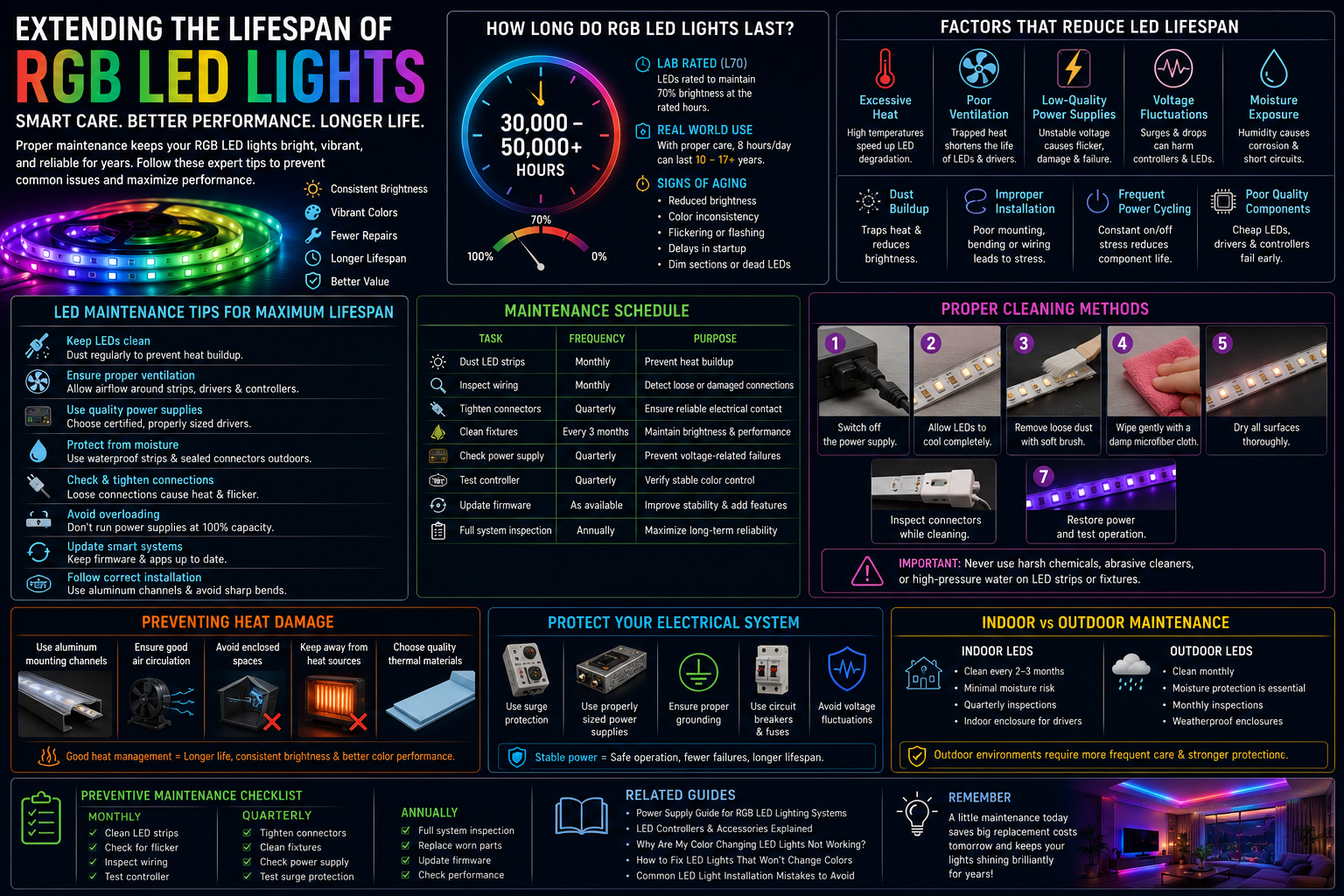
RGB LED lights are widely recognized for their long operating life, but many users misunderstand what manufacturers mean when they advertise lifespans of 30,000, 50,000, or even 100,000 hours. These numbers represent laboratory testing under controlled conditions rather than guaranteed real-world performance. In everyday environments, the actual lifespan depends on installation quality, electrical stability, ambient temperature, operating hours, and maintenance practices.
Average Lifespan
Most quality RGB LED strips and fixtures last between 30,000 and 50,000 operating hours. Premium commercial-grade products may exceed 70,000 hours when installed correctly with adequate cooling. If operated for eight hours each day, a 50,000-hour LED system could potentially remain functional for over 17 years. However, poor ventilation, frequent power surges, or moisture exposure can significantly reduce that lifespan.
Rated Operating Hours
Manufacturers usually define LED lifespan using the L70 standard, meaning the light source still produces 70% of its original brightness after the rated operating hours. This does not mean the LEDs stop working at that point. Instead, brightness gradually decreases until replacement becomes desirable.
Factors That Affect Longevity
Several factors influence LED durability:
- Heat generation
- Driver quality
- Stable voltage
- Installation method
- Environmental moisture
- Dust accumulation
- Operating schedule
- Component quality
A premium LED strip installed with proper heat dissipation often outlasts a cheaper product by several years.
Signs of Aging LED Lights
As LEDs age, users may notice:
- Reduced brightness
- Color inconsistency
- Flickering
- Delayed startup
- Sections of LED strips becoming dim
- Random color changes
Recognizing these warning signs early allows timely maintenance before complete failure occurs.
Factors That Reduce LED Lifespan
Many LED failures result from preventable issues rather than manufacturing defects. Understanding these risks helps users create maintenance routines that significantly improve long-term performance.
Excessive Heat
Heat is the leading cause of premature LED failure. Although LEDs produce less heat than incandescent bulbs, they remain sensitive to high operating temperatures. Heat accelerates semiconductor degradation, weakens solder joints, and shortens the lifespan of drivers and controllers. Installing LED strips inside enclosed spaces without ventilation often traps heat, causing brightness loss and early component failure. Using aluminum mounting channels helps dissipate heat efficiently and extends LED strip longevity.
Poor Ventilation
Air circulation is equally important. Even efficient LEDs require continuous heat dissipation. Poor ventilation raises junction temperatures inside the LED chip, reducing efficiency and accelerating lumen depreciation. Installers should avoid placing LED drivers inside sealed cabinets unless adequate airflow is provided. Commercial installations often include ventilation openings or cooling channels specifically designed to maintain safe operating temperatures.
Low-Quality Power Supplies
The power supply serves as the heart of every RGB LED system. Cheap, poorly regulated drivers frequently produce unstable voltage, excessive ripple, and overheating. These electrical problems place constant stress on LEDs and controllers, eventually leading to flickering, color instability, and shortened service life. Choosing certified, high-quality power supplies with appropriate safety ratings provides a more stable electrical environment and improves overall reliability.
Voltage Fluctuations
Electrical instability is another common cause of premature LED failure. Power surges, brownouts, and fluctuating mains voltage can damage sensitive electronic components within controllers and drivers. Installing surge protection devices and using properly sized power supplies minimizes these risks. In regions with unstable electrical grids, voltage regulators provide additional protection for valuable lighting installations.
Moisture Exposure
Water and humidity pose serious threats to RGB LED systems, especially indoor products without waterproof protection. Moisture causes corrosion on circuit boards, oxidizes connectors, and creates electrical shorts. Outdoor installations should always use appropriately rated waterproof LED strips, sealed connectors, and weather-resistant enclosures for controllers and power supplies.
Dust Buildup
Dust may appear harmless, but it acts as insulation that traps heat around LEDs and electronic components. Over time, accumulated dust restricts airflow, increases operating temperatures, and contributes to overheating. Regular cleaning prevents excessive heat buildup while preserving maximum brightness and color accuracy.
Improper Installation
Improper mounting, excessive bending, unsupported cable runs, and incorrect wiring frequently reduce LED lifespan. LED strips should never be bent beyond manufacturer recommendations or installed on rough, uneven surfaces that place stress on solder joints. Secure mounting and proper cable management reduce mechanical strain and improve long-term durability.
Frequent Power Cycling
Turning LEDs on and off repeatedly places stress on drivers and electronic components. While LEDs tolerate switching far better than fluorescent lamps, unnecessary power cycling still contributes to gradual wear. Smart lighting schedules that reduce excessive switching help maximize component lifespan while maintaining energy efficiency.
LED Maintenance Tips for Maximum Lifespan
Following consistent LED maintenance tips is the easiest and most cost-effective way to extend the lifespan of RGB LED lighting systems. A preventive maintenance routine not only keeps the lights looking bright and vibrant but also helps identify minor issues before they become expensive repairs. Whether your RGB LEDs are installed in a home theater, office, retail store, hotel, or outdoor entertainment area, regular inspections can significantly improve system reliability. Most maintenance tasks require only a few minutes and basic tools, making them practical for both homeowners and professional installers.
Begin with routine visual inspections. Check LED strips for discoloration, uneven brightness, or physical damage. Inspect wiring for loose connectors, cracked insulation, or signs of overheating. Verify that mounting channels remain securely attached and that adhesive-backed strips have not started peeling away from their surfaces. Examine power supplies for unusual noises, excessive heat, or visible swelling. Controllers should respond immediately to commands without lag or random color changes. For smart RGB systems, periodically test mobile app connectivity, voice assistant integration, and automation schedules. Keeping firmware updated ensures compatibility with the latest features while fixing known software bugs that may affect performance.
Maintenance Schedule Table
| Maintenance Task | Frequency | Purpose |
| Dust LED strips | Monthly | Prevent heat buildup |
| Inspect wiring | Monthly | Detect loose or damaged connections |
| Tighten connectors | Quarterly | Ensure reliable electrical contact |
| Clean fixtures | Every 3 months | Maintain brightness |
| Check power supply | Quarterly | Prevent voltage-related failures |
| Test controller | Quarterly | Verify stable color control |
| Update firmware | As available | Improve stability and security |
| Full system inspection | Annually | Maximize long-term reliability |
Proper Cleaning Methods
Cleaning RGB LED lights correctly is essential for maintaining brightness, preventing overheating, and extending service life. Dirt, grease, and airborne particles gradually accumulate on LED strips and fixtures, reducing light output while trapping heat around electronic components. Cleaning should always begin by disconnecting power to eliminate electrical hazards. Allow the LEDs to cool before touching any components, especially after extended operation.
Indoor LED strips can usually be cleaned with a dry microfiber cloth or a lightly damp lint-free cloth. Avoid soaking the strip or allowing water to enter exposed connectors. Outdoor installations require additional care because dirt, pollen, and weather-related debris accumulate more quickly. Waterproof fixtures should be cleaned using a soft cloth and mild soap solution before drying completely. Never use abrasive pads, acetone, ammonia-based cleaners, or harsh chemicals, as these may damage protective coatings and diffuser materials.
Step-by-Step Cleaning Guide
- Switch off the power supply.
- Allow LEDs to cool completely.
- Remove loose dust using a microfiber cloth or soft brush.
- Wipe gently with a slightly damp cloth if necessary.
- Dry all surfaces thoroughly.
- Inspect connectors while cleaning.
- Restore power and test operation.
Preventing Heat Damage
Heat remains the single biggest threat to LED longevity. Although LEDs are energy efficient, they still generate heat within the semiconductor junction. If this heat cannot escape, component temperatures rise rapidly, accelerating lumen depreciation and shortening driver life. Proper thermal management should therefore be considered during installation rather than after problems appear.
Aluminum mounting channels provide one of the most effective cooling solutions for LED strips. These channels act as heat sinks, drawing heat away from the LEDs while providing a secure mounting surface. Good ventilation also plays a vital role. Avoid enclosing power supplies inside sealed cabinets without airflow, and never install LED strips directly against insulating materials that prevent heat dissipation. Selecting installation locations away from ovens, radiators, boilers, or direct sunlight further reduces thermal stress. Combining these practices allows LEDs to operate closer to their rated lifespan while maintaining consistent brightness and color quality.
Protecting Your Electrical System
Electrical protection is equally important when maximizing RGB LED lifespan. Even premium LEDs cannot compensate for unstable electrical conditions. Frequent voltage fluctuations, overloaded power supplies, or poor grounding gradually damage drivers, controllers, and LED chips. Installing surge protection devices helps absorb sudden voltage spikes caused by lightning or switching events within the electrical system.
Power supplies should always be sized with additional capacity rather than operated continuously at maximum load. Many professionals recommend loading a power supply to approximately 80 percent of its rated capacity for improved efficiency and cooler operation. Proper grounding minimizes electrical noise while improving user safety. Circuit breakers and appropriate fuses provide another layer of protection by disconnecting power during abnormal operating conditions. Together, these measures create a stable electrical environment that protects your RGB lighting investment for many years.
Maintaining Smart RGB LED Lights
Smart RGB lighting introduces additional maintenance considerations beyond traditional LED systems. Firmware updates frequently improve compatibility, fix software bugs, strengthen cybersecurity, and add new automation features. Ignoring updates may result in connectivity issues or unreliable performance with smart home ecosystems.
Regularly review your mobile application to ensure devices remain connected and synchronized. If your LEDs rely on Wi-Fi, position the controller where signal strength remains stable. Bluetooth devices should remain within their recommended operating range to avoid delayed responses. Controllers should be protected from excessive heat, moisture, and dust just like any other electronic component. Whenever replacing accessories, confirm compatibility with both the controller and LED strip to avoid communication errors or incorrect color reproduction.
Indoor vs Outdoor LED Maintenance
| Maintenance Task | Indoor LEDs | Outdoor LEDs |
| Cleaning Frequency | Every 2–3 months | Monthly |
| Moisture Protection | Minimal | Essential |
| Inspection Schedule | Quarterly | Monthly |
| Power Supply Care | Indoor enclosure | Weatherproof enclosure |
| Connector Maintenance | Occasional | Frequent corrosion checks |
Outdoor RGB LED installations require additional attention because they face rain, humidity, ultraviolet radiation, dust, insects, and temperature extremes. Waterproof connectors should be inspected regularly for damaged seals, while weatherproof enclosures should remain securely closed to prevent moisture intrusion. Replacing deteriorated gaskets before leaks develop greatly extends system reliability.
Common Maintenance Mistakes to Avoid
Many RGB LED failures stem from avoidable maintenance errors rather than defective products. One of the most common mistakes is ignoring dust buildup until brightness noticeably declines. Another frequent issue is blocking ventilation by installing LED strips inside enclosed spaces without airflow. Overloading power supplies also creates excessive heat that shortens component life.
Avoid using harsh cleaning chemicals that can damage protective coatings or diffuser lenses. Do not mix incompatible controllers, drivers, or accessories from different voltage systems without confirming compatibility. Finally, never postpone repairs after noticing flickering, overheating, or intermittent color changes. Addressing minor issues early almost always costs less than replacing an entire lighting system.
olor Changing LED Lights offer an easy way to transform any space with customizable colors, smart controls, and energy-efficient performance. Whether you’re decorating a home, upgrading a gaming room, or planning event lighting, our complete guide covers everything from choosing the right LEDs to installation, troubleshooting, and maintenance. Explore the Color Changing LED Lights guide to learn more.
Preventive Maintenance Checklist
Monthly Tasks
- Remove dust from LED strips.
- Check for flickering or dim sections.
- Inspect exposed wiring.
- Verify controller response.
Quarterly Tasks
- Tighten electrical connectors.
- Clean fixtures thoroughly.
- Inspect power supply ventilation.
- Test surge protection devices.
Annual Tasks
- Perform complete system inspection.
- Replace worn connectors.
- Review firmware updates.
- Test overall electrical performance.
- Replace aging power supplies if necessary.
When Should You Replace LED Components?
Not every issue requires replacing the entire RGB lighting system. Individual LED strips can usually be replaced when sections become permanently dim or develop multiple failed LEDs. Power supplies showing excessive heat, buzzing sounds, or unstable voltage should also be replaced promptly before damaging connected components.
Controllers may require replacement if firmware updates no longer resolve communication problems or if color output becomes inconsistent despite healthy LED strips. Wiring and connectors should be replaced whenever corrosion, overheating, or mechanical damage becomes visible. In general, replacement becomes more cost-effective than repair when multiple major components fail simultaneously or when repair costs approach the price of a modern, higher-efficiency system.
Conclusion
Following practical LED maintenance tips is one of the smartest ways to extend the lifespan of RGB LED lighting systems. Regular cleaning, proper electrical protection, effective heat management, and routine inspections all contribute to consistent brightness, reliable color performance, and lower long-term maintenance costs. A proactive maintenance schedule allows homeowners, businesses, installers, and facility managers to identify small issues before they become expensive failures.
For even better system performance, consider exploring related guides such as Power Supply Guide for RGB LED Lighting Systems, LED Controllers and Accessories Explained, Why Are My Color Changing LED Lights Not Working?, How to Fix LED Lights That Won’t Change Colors, and Common LED Light Installation Mistakes to Avoid. Building a preventive maintenance routine today will help your RGB LED lighting continue delivering vibrant colors and dependable performance for many years.
Frequently Asked Questions
1. How long do RGB LED lights usually last?
High-quality RGB LED lights generally last between 30,000 and 50,000 hours, while premium systems may exceed 70,000 hours with proper maintenance.
2. How often should LED strips be cleaned?
Indoor LED strips should typically be cleaned every two to three months, while outdoor installations benefit from monthly cleaning.
3. Does heat reduce LED lifespan?
Yes. Excessive heat accelerates LED degradation, reduces brightness, and shortens the lifespan of drivers and controllers.
4. Can a faulty power supply damage LED lights?
Absolutely. Poor-quality or overloaded power supplies can cause voltage instability, flickering, overheating, and premature LED failure.
5. Should smart RGB LED firmware be updated?
Yes. Firmware updates improve performance, compatibility, security, and overall reliability of smart lighting systems.