Smart LED lighting has become one of the fastest-growing categories in home automation. Modern smart bulbs, RGB strips, and LED controllers combine energy-efficient lighting with wireless connectivity, voice control, scheduling, and automation. As smart home adoption continues to grow globally, homeowners increasingly rely on these systems for convenience, ambiance, and energy savings. Yet even the best smart lighting setup can occasionally experience connection failures, synchronization issues, or app-related glitches.
This guide focuses on smart LED troubleshooting and explains how to diagnose and fix the most common problems users encounter with WiFi, Bluetooth, Zigbee, and Matter-compatible lighting systems. Whether your lights refuse to connect, randomly disconnect, show the wrong colors, or stop responding to Alexa, Google Home, or Apple Home, you will find practical solutions here. The goal is to help homeowners, installers, IT professionals, and facility managers restore reliable smart lighting without unnecessary replacement costs.
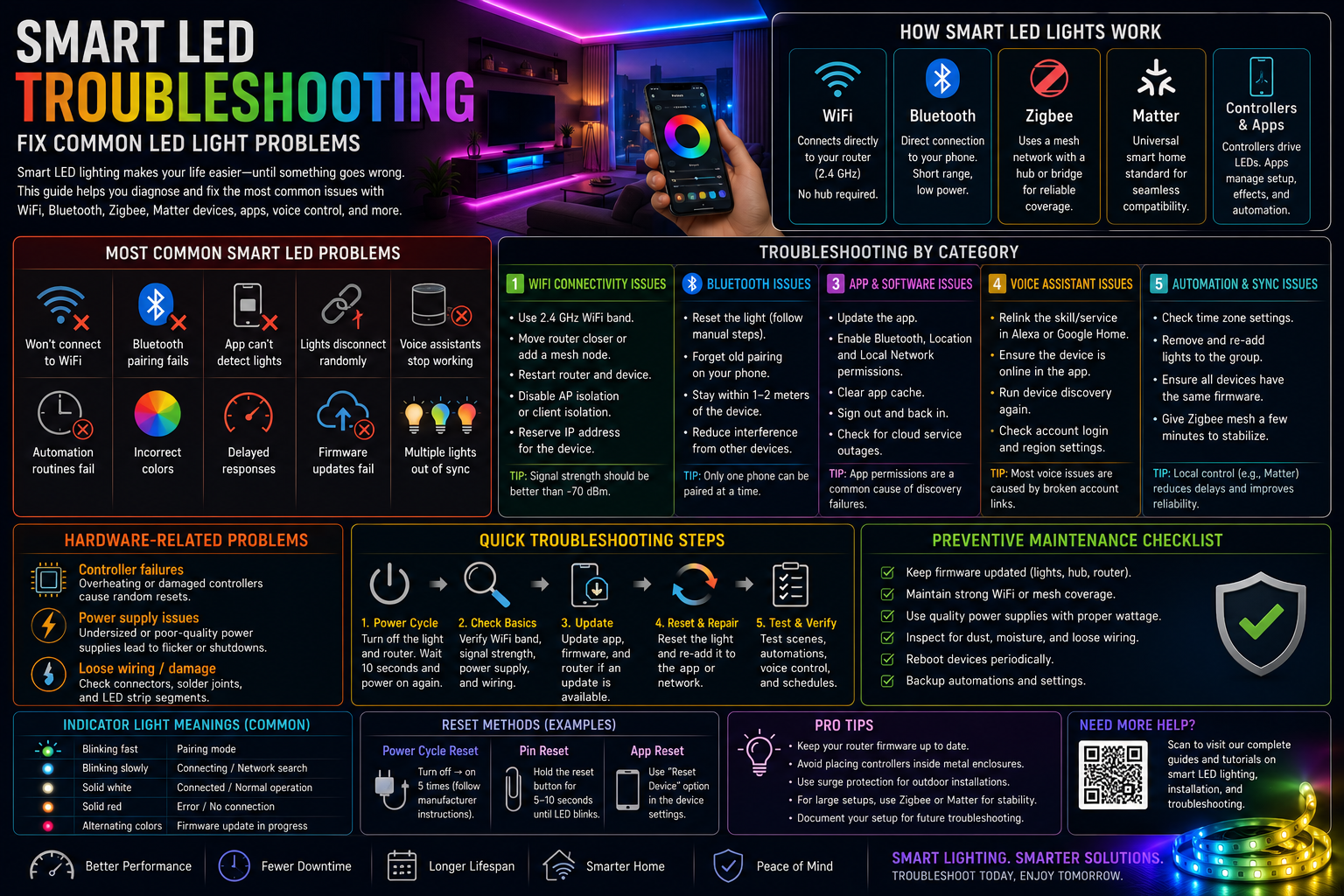
How Smart LED Lights Work
Understanding the technology behind smart lighting makes troubleshooting much easier. Most smart LED lights problems occur because communication between the light, controller, app, and home network breaks down somewhere along the chain.
Smart Color Changing LED Lights let you customize your lighting with millions of colors, adjustable brightness, scheduling, and voice control through popular smart home platforms. Whether you’re upgrading your home, gaming setup, or outdoor space, our complete guide explains how smart RGB lighting works, its key features, installation tips, and how to choose the best system for your needs.
WiFi Smart Lights
WiFi smart lights connect directly to your home router, usually on the 2.4 GHz band. The light receives commands from a cloud service or local network and adjusts brightness, color, or power state accordingly. These lights are convenient because they do not require a separate hub, but they depend heavily on router stability and signal strength.
Bluetooth Smart Lights
Bluetooth lights communicate directly with a phone or tablet. They are simple to install and work well in single-room setups. However, Bluetooth has a shorter range than WiFi, so distance and interference often cause Bluetooth LED lights issues.
Zigbee Lighting Systems
Zigbee LED lights use a low-power mesh network. Each powered device can relay signals to nearby devices, extending coverage throughout the building. A Zigbee hub or bridge coordinates communication between the lights and your smart home platform.
Matter-Compatible Devices
Matter smart lighting devices use a standardized protocol designed to improve interoperability across brands. Matter runs over IP networks and often uses Thread for low-power communication. The technology is becoming increasingly important as major ecosystems adopt it to reduce compatibility problems. Industry adoption continues to expand as manufacturers release more Matter-certified lighting products.
A Status Review +1
Smart Controllers and Mobile Apps
LED strips and advanced RGB systems often rely on external controllers. The controller handles color mixing, effects, and network communication. Mobile apps provide the user interface for setup, automation, and firmware management. If either the controller or app malfunctions, the entire lighting system may appear unresponsive.
Most Common Smart LED Light Problems
Users frequently encounter a handful of recurring issues regardless of brand. These symptoms usually point to network, software, integration, or hardware faults rather than failed LEDs.
Problem
Typical Cause
Lights will not connect to WiFi
Wrong network band or weak signal
Bluetooth pairing fails
Distance, interference, or stale pairing data
App cannot detect lights
Permissions, firmware, or network mismatch
Lights disconnect randomly
Router instability or power interruptions
Voice assistants stop working
Account linking or cloud synchronization issues
Automation routines fail
Scheduler conflicts or offline devices
Incorrect colors appear
Controller configuration or damaged LED channels
Delayed responses
Network congestion or cloud latency
Firmware updates fail
Unstable connection during update
Multiple lights are out of sync
Group communication or mesh routing problems
WiFi Connectivity Problems
Connectivity issues account for a large percentage of smart LED lights not working complaints. The good news is that most can be resolved without replacing any hardware.
Incorrect Network Band
Many smart lights support only 2.4 GHz WiFi. If your phone is connected to a 5 GHz-only network during setup, the app may fail to discover the device.
Fix: Enable the 2.4 GHz band on your router, connect your phone to that band during setup, and temporarily disable band steering if necessary.
Weak WiFi Signal
LED controllers installed behind cabinets, inside ceilings, or outdoors often receive a poor signal.
Fix: Move the router closer, add a mesh node, or relocate the controller to a less shielded position. A signal strength below about -70 dBm frequently causes intermittent disconnects.
Router Configuration and IP Conflicts
Advanced router settings can also create network connectivity issues. MAC filtering, client isolation, aggressive security settings, or duplicate IP addresses may prevent communication.
Step-by-step troubleshooting:
- Restart the router and the LED device.
- Reserve a dedicated IP address for the light in the router settings.
- Disable AP isolation or guest-network restrictions.
- Check whether another device is using the same IP address.
- Temporarily disable firewall rules that block local device discovery.
Bluetooth Connection Issues
Pairing Failures and Distance Limitations
Bluetooth pairing often fails because the light is already paired with another phone or remains in a partially configured state.
Try this sequence:
- Turn the light off and on according to the manufacturer’s reset procedure.
- Delete the old pairing entry from your phone.
- Move within 1–2 meters of the light during setup.
- Disable Bluetooth on nearby devices temporarily.
Bluetooth performance drops rapidly with distance and obstacles. Thick walls, metal cabinets, and appliances can significantly reduce range.
Device Interference and Bluetooth Reset
Wireless earbuds, speakers, and fitness devices all compete for Bluetooth airtime. If smart RGB LED troubleshooting points to unstable Bluetooth behavior, reduce nearby wireless activity and perform a Bluetooth reset on the light and phone before pairing again.
Smart Home Integration Problems
Alexa, Google Home, and Apple Home Issues
Voice assistant problems usually occur after password changes, app updates, or network modifications.
For Alexa LED problems:
- Open the Alexa app.
- Disable the lighting skill.
- Re-enable the skill and sign in again.
- Run device discovery.
For Google Home LED issues:
- Remove the affected home integration.
- Link the manufacturer account again.
- Verify that the light appears correctly in the manufacturer’s app first.
For Apple Home smart lighting: Ensure the device supports HomeKit or Matter and confirm that the home hub is online and updated.
Matter and Zigbee Troubleshooting
If a Matter device refuses to commission, verify that the QR code or setup code is correct and that your Thread border router or hub is online. Matter is designed to improve interoperability, but commissioning can still fail if firmware versions are mismatched.
Smart Home Device Solution +1
For Zigbee systems, check whether the hub has available capacity and whether recently added devices are weakening the mesh by being placed too far apart.
Mobile App Problems
LED app connection issues can make perfectly functional lights appear broken. Common symptoms include missing devices, endless loading screens, and login failures.
Check the following:
- Update the app to the latest version.
- Enable local network, Bluetooth, and location permissions.
- Clear the app cache if available.
- Sign out and back in.
- Verify that the manufacturer’s cloud service is not experiencing an outage.
On Android and iOS, denying local network access is a surprisingly common cause of discovery failures because the app cannot scan the LAN for devices.
Firmware and Software Issues
Why Firmware Matters
Firmware controls wireless communication, color processing, dimming behavior, and automation support. Manufacturers frequently release updates to improve stability and compatibility.
Safe Firmware Updates
- Keep the light powered continuously during the update.
- Ensure strong WiFi or hub connectivity.
- Update devices one group at a time rather than all simultaneously.
Failed Updates and Factory Reset
If an LED firmware update fails, leave the device powered for several minutes before restarting it. Many controllers can recover automatically. If recovery fails, perform a smart LED reset using the manufacturer’s power-cycle sequence and then re-add the device to the app.
Automation and Scheduling Problems
When timers, scenes, or routines stop working, the issue is usually with synchronization rather than the LED hardware itself.
Common causes include:
- Incorrect time zone settings.
- Duplicate schedules controlling the same light.
- Offline hubs or controllers.
- Cloud service delays.
For LED synchronization problems:
- Remove the affected lights from the group.
- Re-add them one at a time.
- Ensure all devices are running the same firmware version.
- For Zigbee systems, allow the mesh network several minutes to rebuild routes after changes.
Automation delays are often reduced by using local-control platforms or Matter-enabled devices that avoid unnecessary cloud round trips.
Hardware Problems
Not every failure is software-related. Physical faults can produce symptoms that look like connectivity issues.
Controller Failures
An overheating or damaged controller may reboot repeatedly, causing lights to disconnect and reconnect every few minutes.
Power Supply Issues
Undersized power supplies cause flickering, color shifts, and unexpected shutdowns, especially with long RGB LED strips. Verify that the supply provides adequate voltage and current for the total LED load.
Loose Wiring and LED Strip Damage
Loose connectors can interrupt data or power to parts of the strip. Damaged LED segments often display incorrect colors or remain dark while the rest of the strip works normally. Inspect solder joints, connectors, and cable strain points carefully.
Quick Troubleshooting Guide
| Problem | Possible Cause | Recommended Solution |
| Won’t connect to WiFi | 5 GHz network or weak signal | Use 2.4 GHz and move closer to router |
| Bluetooth not pairing | Stale pairing data | Forget device and reset the light |
| App cannot detect device | Missing permissions | Enable Bluetooth and local network access |
| Voice assistant not working | Account link broken | Relink the skill or service |
| Automation fails | Time zone or offline device | Verify schedules and connectivity |
| Lights disconnect randomly | Poor signal or power issue | Improve WiFi and check power supply |
| Wrong colors displayed | Controller or LED damage | Check wiring and recalibrate colors |
| Firmware update failed | Interrupted connection | Retry update after reboot |
Preventing Smart LED Problems
Preventive maintenance is far easier than emergency troubleshooting. A few habits dramatically improve reliability.
Keep firmware updated on lights, hubs, and routers.
Maintain strong WiFi coverage in all lighting areas.
Use compatible ecosystems instead of mixing unsupported platforms.
Secure the network with WPA2 or WPA3 encryption.
Avoid connecting dozens of IoT devices to a weak consumer router.
Choose quality LED controllers with adequate cooling.
Follow manufacturer installation guidelines for voltage, wiring, and spacing.
Preventive maintenance checklist:
- Update firmware monthly.
- Reboot the router every few months if stability declines.
- Inspect power supplies for overheating.
- Test automation routines after major app updates.
- Verify backup schedules before vacations or business closures.
Common Mistakes to Avoid
Many recurring smart lighting problems come from installation shortcuts rather than defective products.
- Using unsupported WiFi frequencies during setup.
- Mixing incompatible ecosystems without a proper bridge.
- Ignoring firmware updates for months.
- Placing the router inside a metal cabinet.
- Denying app permissions that are required for device discovery.
- Buying controllers that cannot handle the LED strip’s power requirements.
- Running low-voltage LED cables alongside high-voltage power cables without proper separation.
Professional installers often treat smart lighting like networking equipment rather than simple lamps. That mindset helps prevent many failures before they occur.
Frequently Asked Questions
Why won’t my smart LED lights connect?
Most lights require a 2.4 GHz WiFi network. Verify signal strength, reset the device, and confirm that your phone is on the same network during setup.
Why do my LED lights keep disconnecting?
Intermittent WiFi, power fluctuations, or overheating controllers are the most common causes.
How do I reset smart LED lights?
Follow the manufacturer’s reset sequence, usually involving several rapid power cycles until the light blinks.
Why isn’t Alexa controlling my lights?
Relink the lighting skill, refresh device discovery, and make sure the light is online in the manufacturer’s app.
Why can’t Google Home find my lights?
Remove and reconnect the linked service, then run device synchronization again.
How do I fix Bluetooth LED lights?
Delete old pairings, move closer to the light, reduce interference, and pair again after a reset.
What is Matter compatibility?
Matter is a standardized smart home protocol designed to let devices from different brands work together more reliably.
Smart Home Device Solution +1
Why won’t my LED app detect the lights?
Check local network permissions, Bluetooth access, firmware status, and whether the phone is on the correct network.
Should I update LED firmware?
Yes. Firmware updates often improve stability, security, and compatibility with Alexa, Google Home, Apple Home, and Matter platforms.
Why do my smart lights respond slowly?
Network congestion, cloud latency, or weak WiFi coverage can delay commands.
Can WiFi interference affect LED lights?
Yes. Nearby routers, microwaves, and other wireless devices can reduce signal quality and cause disconnects.
How do I keep multiple smart lights synchronized?
Use the same firmware version across all lights, keep them in a single group, and ensure strong network or mesh coverage.
Conclusion
Smart LED troubleshooting becomes much easier when you separate problems into four categories: connectivity, software, integration, and hardware. Most failures are not caused by burned-out LEDs. Instead, they result from weak WiFi signals, Bluetooth interference, outdated firmware, hub synchronization issues, or misconfigured automation routines. By checking the network first, then the app, then integrations, and finally the physical hardware, you can resolve the vast majority of smart LED lights problems without replacing the lighting system.
Color Changing LED Lights are a versatile lighting solution that combines vibrant RGB colors, energy efficiency, and smart control features to enhance any indoor or outdoor space. Whether you’re decorating a home, creating an immersive gaming setup, or planning event lighting, our comprehensive guide covers everything from choosing the right LEDs to installation, troubleshooting, maintenance, and the latest smart lighting technologies.
Regular maintenance is the key to long-term reliability. Keep firmware current, maintain strong wireless coverage, use compatible ecosystems, and inspect controllers and power supplies periodically. As Matter, Zigbee, WiFi, and Thread-based lighting continue to evolve, a well-maintained setup will deliver faster response times, better automation, and fewer frustrating disconnects. If you want to go deeper, explore guides on Smart Color Changing LED Lights Explained, Bluetooth vs WiFi Color Changing LED Lights, LED Controllers and Accessories Explained, Why Are My Color Changing LED Lights Not Working?, and How to Sync Multiple Color Changing LED Lights to build a smarter and more reliable lighting system.