Introduction
Imagine walking into your home and watching every LED strip, smart bulb, ceiling light, and gaming light bar change colors at exactly the same moment. Instead of controlling each fixture individually, every light responds as one synchronized lighting system. That is exactly what LED light synchronization makes possible. Whether you are designing a smart home, upgrading a gaming room, decorating a home theater, organizing an event, or adding atmosphere to a retail store, synchronized lighting delivers a cleaner, smarter, and far more immersive experience.
Today’s color changing LED lights support several synchronization technologies including Bluetooth, WiFi, Zigbee, Matter, Thread, and professional DMX lighting systems. Modern ecosystems also allow users to create lighting groups, automate scenes, synchronize lights with music, and even control multiple rooms using a single mobile application or voice assistant. Recent developments in the Matter smart home standard continue improving compatibility between brands, making synchronized smart lighting easier than ever before. Manufacturers are also expanding support for simultaneous communication protocols, helping devices integrate across multiple ecosystems without sacrificing features.
This guide explains every major synchronization method, shows you how to choose compatible products, and provides practical installation advice that beginners and experienced smart home users can follow with confidence.
How LED Synchronization Works
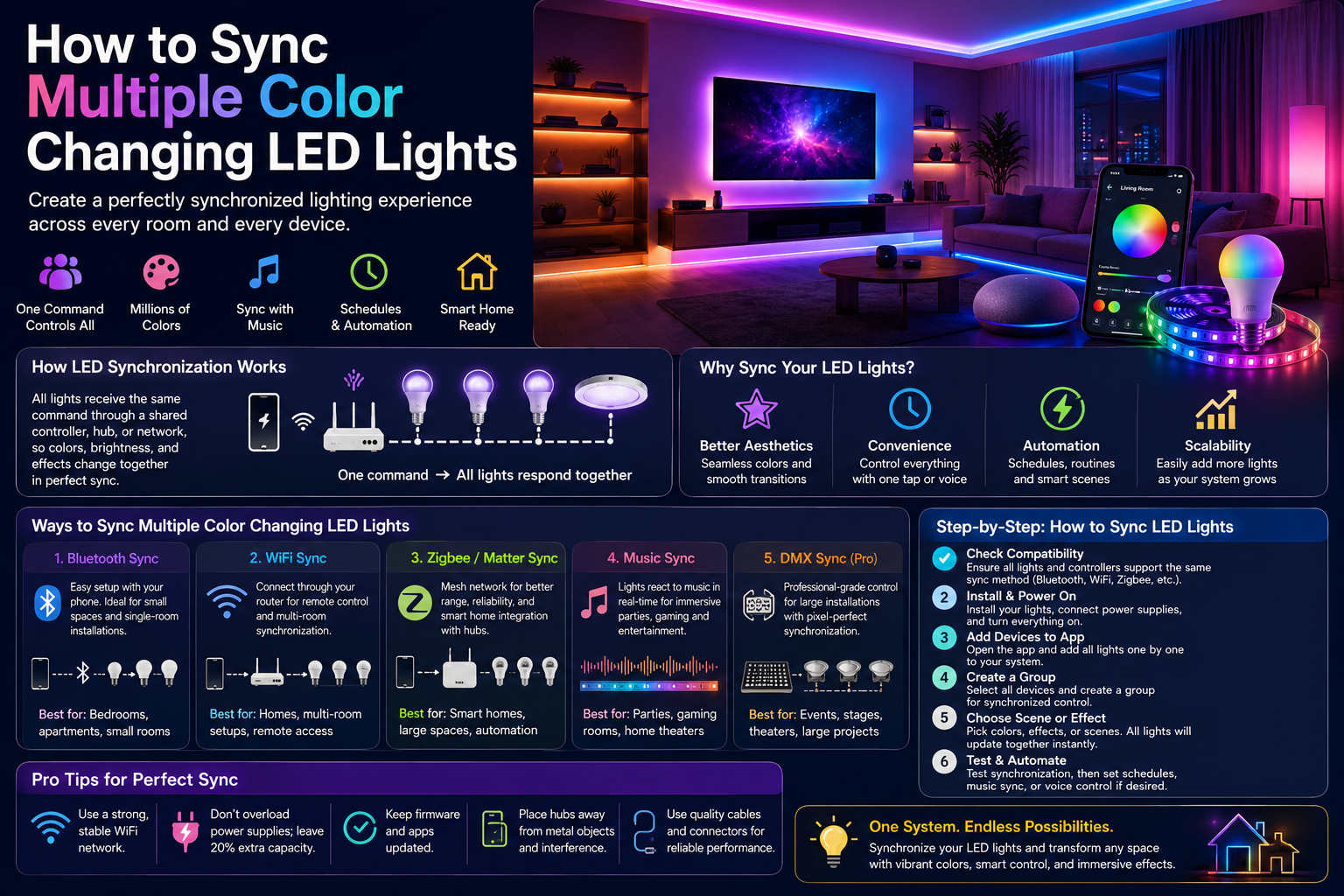
At its simplest, LED synchronization means multiple lighting devices receive the same command simultaneously. Instead of each bulb operating independently, they communicate through a shared controller, smart hub, wireless protocol, or dedicated application. When you select a color, brightness level, animation, or scene, every light in the synchronized group updates together. This creates a seamless visual effect without noticeable delays between devices.
Different systems accomplish synchronization in different ways. Bluetooth models often communicate directly with a smartphone or through Bluetooth Mesh networking. WiFi systems connect through the home’s wireless router, allowing remote access from anywhere with an internet connection. Zigbee and Matter ecosystems rely on mesh networking and smart home hubs to improve coverage, reliability, and interoperability across different manufacturers. Professional installations, including concerts and theaters, frequently use DMX controllers because they offer frame-perfect timing across hundreds of fixtures.
Synchronization is not only about matching colors. Modern systems can coordinate brightness transitions, dynamic animations, gradient effects, timers, schedules, occupancy automation, and voice commands. Some advanced addressable RGB lighting systems can even synchronize complex animations across dozens of individual LED strips while maintaining smooth transitions. Matter-compatible lighting continues expanding support for Wi-Fi, Thread, and cross-platform control, allowing users to combine devices from different brands more easily than previous proprietary ecosystems.
Why Synchronizing Lights Matters
Synchronizing multiple LED lights dramatically improves both aesthetics and convenience. Imagine watching a movie where the wall lights fade together, gaming lights react simultaneously, or an entire office shifts from warm lighting in the morning to bright white illumination during work hours. Instead of manually adjusting every fixture, one command updates the entire environment instantly.
For homeowners, synchronization simplifies daily routines. You can schedule lights to wake you gradually, activate relaxing evening scenes, or automatically switch off every room before bedtime. Event planners use synchronized lighting to produce professional-looking effects without needing complex manual control during performances. Retail businesses create attractive shopping environments by coordinating lighting across displays, shelves, and entrances, improving customer experience through consistent visual branding.
Another major advantage is scalability. Once a synchronized lighting group has been configured correctly, adding additional compatible fixtures becomes significantly easier. Rather than building separate lighting systems for every room, users simply expand existing groups and scenes. Modern smart lighting ecosystems increasingly support automation platforms, enabling synchronized lighting to work alongside security systems, motion sensors, thermostats, and voice assistants for a truly connected smart home experience.
Ways to Sync Multiple Color Changing LED Lights
Choosing the right synchronization method is one of the most important decisions when building a smart lighting system. The best option depends on your home size, the number of lights you plan to install, whether you need remote access, and how much automation you want. Some technologies are designed for small apartments and bedrooms, while others can control hundreds of fixtures across commercial buildings or entertainment venues. Understanding the strengths and limitations of each method will help you avoid compatibility issues and create a lighting system that can grow with your needs.
Bluetooth Synchronization
Bluetooth remains one of the simplest ways to sync multiple LED lights, especially for beginners. Since Bluetooth lights communicate directly with a smartphone or tablet, setup usually takes only a few minutes without requiring a router or internet connection. Most Bluetooth-enabled LED strips and smart bulbs allow users to pair several fixtures within the same mobile application and organize them into lighting groups. Once grouped, every light responds simultaneously to commands such as changing colors, adjusting brightness, or activating preset scenes.
Modern Bluetooth systems have become far more powerful thanks to Bluetooth Mesh technology. Instead of relying on one direct connection between the phone and each light, every compatible light can relay signals to nearby devices. This creates a mesh network that extends communication range and improves synchronization across larger spaces. Bluetooth Mesh is particularly useful for homes with multiple rooms or offices where direct connections would otherwise be unreliable.
Bluetooth lighting performs best in bedrooms, gaming setups, apartments, and smaller homes where devices remain relatively close together. The main limitation is communication range, which typically extends between 30 and 100 feet depending on walls, interference, and device quality. Large commercial buildings or multi-story homes often require WiFi or Zigbee instead. Users should also remember that Bluetooth control usually requires the controlling device to remain within range unless a dedicated bridge or gateway has been installed.
WiFi Synchronization
WiFi has become the most popular synchronization method for modern smart LED lights because it offers convenience, flexibility, and remote access. Instead of connecting directly to a smartphone, every compatible light joins the home’s wireless network. This allows users to control lighting from anywhere using cloud-connected mobile applications, voice assistants, or smart home platforms. Whether you’re sitting in another room or traveling across the country, your lighting system remains accessible as long as both the lights and your smartphone have internet connectivity.
One of WiFi’s greatest advantages is multi-room management. Users can create groups for kitchens, bedrooms, living rooms, outdoor patios, or entire floors while maintaining centralized control. Schedules, routines, and automation become significantly easier because every connected light shares the same network infrastructure. WiFi systems also integrate seamlessly with voice assistants, allowing users to activate scenes through simple spoken commands instead of manually opening an application.
The primary consideration with WiFi lighting is network quality. Weak wireless coverage, overloaded routers, or excessive network congestion may introduce slight response delays when controlling many devices simultaneously. Installing modern dual-band or WiFi 6 routers, placing access points strategically, and maintaining strong signal strength helps minimize synchronization issues. For most homeowners seeking flexible wireless LED lighting, WiFi continues to provide the best balance between simplicity and advanced automation.
Zigbee and Matter Compatible Systems
Zigbee has long been recognized as one of the most reliable protocols for smart home lighting because it creates a self-healing mesh network. Every powered Zigbee device acts as a repeater, forwarding signals throughout the network and improving overall reliability as additional devices are installed. Unlike WiFi, Zigbee places very little load on the home router because communication occurs through a dedicated smart home hub.
The introduction of Matter has significantly changed the smart lighting landscape. Matter is an industry-wide interoperability standard supported by major technology companies and lighting manufacturers. Instead of locking users into one proprietary ecosystem, Matter enables compatible devices from different brands to communicate more effectively through common standards. This reduces compatibility concerns and allows homeowners to mix products without sacrificing automation capabilities.
Matter also works alongside Thread, another low-power mesh networking protocol designed for fast and reliable smart home communication. Together, Zigbee, Thread, and Matter represent the future of connected lighting by improving cross-brand compatibility, simplifying installation, and reducing dependence on proprietary applications. Homeowners planning long-term smart home investments should strongly consider Matter-compatible lighting because it provides greater flexibility as new devices become available.
DMX Lighting Systems
While Bluetooth, WiFi, and Zigbee dominate residential installations, DMX lighting control remains the professional standard for entertainment and commercial lighting. Originally developed for theaters and stage productions, DMX can control hundreds of lighting fixtures with precise timing and virtually no noticeable delay. Every fixture receives digital control signals from a central controller, allowing synchronized animations, color changes, brightness transitions, and complex lighting sequences.
Concerts, television studios, architectural lighting installations, hotels, convention centers, amusement parks, and large event venues rely heavily on DMX because of its reliability and scalability. Unlike consumer smart lighting systems, DMX prioritizes precise synchronization over remote internet access or voice control. Lighting designers can choreograph entire shows where every fixture responds within milliseconds, creating dramatic visual effects impossible with ordinary home lighting systems.
Although DMX requires specialized controllers and programming knowledge, many hybrid systems now combine DMX with smart home technologies. This allows businesses and event organizers to benefit from professional-grade synchronization while maintaining modern automation capabilities.
Synchronization Method Comparison
| Feature | Bluetooth | WiFi | Zigbee / Matter | DMX |
| Typical Range | Short | Whole home | Whole home via mesh | Very large |
| Internet Required | No | Usually Yes for remote control | No (hub-based) | No |
| Multi-Room Support | Limited | Excellent | Excellent | Excellent |
| Voice Assistant Support | Limited | Excellent | Excellent | Rare |
| Scalability | Moderate | High | Very High | Professional Grade |
| Installation Difficulty | Easy | Easy | Moderate | Advanced |
| Best For | Bedrooms, Gaming | Homes | Smart Homes | Events, Stages, Commercial |
Choosing Compatible LED Lights
Before purchasing additional fixtures, compatibility should always be your first consideration. Even lights that appear identical may use different communication protocols or controllers, preventing proper synchronization. Planning compatibility from the beginning saves both time and money while ensuring a reliable lighting experience.
Brand Compatibility
Many manufacturers build closed ecosystems where devices communicate only with products from the same brand. Purchasing lights from one ecosystem generally provides the smoothest setup process because mobile applications, firmware updates, and lighting scenes are designed specifically for those products. Matter-certified devices reduce these limitations by improving interoperability across supported ecosystems.
Controller Compatibility
RGB controllers determine how LED strips receive commands. If multiple strips use incompatible controllers, synchronization may fail even when the LEDs themselves are identical. Always verify voltage, protocol, connector type, and controller specifications before combining products.
Communication Protocols
The communication protocol is effectively the language your devices use. Bluetooth devices communicate differently from WiFi devices, while Zigbee, Thread, Matter, and DMX each follow their own standards. Mixing protocols without appropriate bridges or hubs often results in separate lighting groups rather than one synchronized system.
Firmware Versions
Keeping firmware updated ensures devices receive performance improvements, bug fixes, security patches, and expanded compatibility. Manufacturers frequently release firmware updates that improve synchronization accuracy or add support for new automation platforms.
Compatibility Checklist
| Item | Check |
| All lights use the same communication protocol | ✅ |
| Controllers support identical RGB standards | ✅ |
| Firmware updated on every device | ✅ |
| Mobile app supports group control | ✅ |
| WiFi signal is strong in every room | ✅ |
| Smart hub supports all connected devices | ✅ |
| Voice assistant integration verified | ✅ |
| Matter certification confirmed (if applicable) | ✅ |
Step-by-Step Guide to Sync Multiple LED Lights
Once you have selected compatible color changing LED lights, the next step is configuring them into a synchronized lighting system. Whether you are using Bluetooth, WiFi, Zigbee, Matter, or another smart lighting protocol, the installation process follows the same basic principles. Careful preparation helps eliminate pairing problems, inconsistent colors, and delayed responses. Follow these steps to build a reliable lighting setup that is easy to control and expand in the future.
Step 1: Verify Compatibility
Before powering on any lights, verify that every fixture supports the same communication standard or is certified to work together. Check the manufacturer’s specifications for Bluetooth Mesh, WiFi, Zigbee, Thread, Matter, or DMX compatibility. If using LED strips, confirm that controllers support the same voltage, RGB format (RGB, RGBW, or RGBCCT), and connector type.
Troubleshooting Tip:
If a device does not appear inside the mobile app, reset it to factory settings and confirm that it is compatible with the rest of your lighting system.
Step 2: Install the Mobile App
Download the official app recommended by your lighting manufacturer. Most smart lighting brands provide apps that allow users to add devices, create lighting groups, configure scenes, schedule automations, and update firmware. Create an account if required and enable Bluetooth, WiFi, or location permissions during setup.
Troubleshooting Tip:
If the app cannot discover devices, ensure Bluetooth is enabled, connect your phone to the correct WiFi network, and temporarily disable VPN services that may interfere with local device discovery.
Step 3: Connect Each Light
Power on every light individually and follow the manufacturer’s pairing instructions. Many smart bulbs automatically enter pairing mode when first powered on, while others require turning the light on and off several times to activate discovery mode.
Assign meaningful names such as:
- Living Room Strip
- Bedroom Lamp
- Gaming Desk
- Kitchen Ceiling
- Patio Lights
Clear naming makes future automation and troubleshooting significantly easier.
Troubleshooting Tip:
If one light refuses to pair, move it closer to the router or smart hub during initial setup before relocating it permanently.
Step 4: Create a Lighting Group
Grouping is the heart of LED light synchronization. Within the mobile app, create groups based on rooms, activities, or entire floors. Once grouped, every device receives the same commands simultaneously.
Examples include:
- Entire Home
- Upstairs
- Downstairs
- Home Theater
- Gaming Room
- Office
- Outdoor Lighting
Grouping simplifies everyday control because you no longer need to manage each light individually.
Troubleshooting Tip:
If one light responds slower than the others, remove it from the group and add it again after updating its firmware.
Step 5: Configure Scenes
Scenes allow multiple settings to activate with one command. Instead of manually selecting colors and brightness every time, simply choose a saved scene.
Popular scenes include:
- Warm Evening
- Bright Morning
- Movie Night
- Gaming Mode
- Reading
- Dinner
- Holiday Lighting
Scenes can also include timers, gradual fades, and automation triggers.
Troubleshooting Tip:
If scene colors appear inconsistent, verify that every light supports the same color range and color temperature settings.
Step 6: Test Synchronization
After creating your lighting groups, test several commands.
Try changing:
- Colors
- Brightness
- Saturation
- Lighting effects
- Power On/Off
- Animated scenes
Observe whether every light responds simultaneously. Small delays may indicate weak wireless coverage or outdated firmware.
Troubleshooting Tip:
Restart your router, smart hub, or Bluetooth controller if synchronization becomes inconsistent.
Step 7: Enable Voice Control (Optional)
Most smart lighting ecosystems support voice assistants.
Examples include:
- Amazon Alexa
- Google Assistant
- Apple HomeKit
- Matter-enabled smart home platforms
Once connected, you can use voice commands such as:
- Turn on living room lights.
- Set movie mode.
- Change lights to blue.
- Dim lights to 30 percent.
- Turn off all lights.
Voice automation becomes even more powerful when combined with schedules, occupancy sensors, and smart routines.
Troubleshooting Tip:
If voice commands fail, reconnect the smart home service inside the voice assistant application and resynchronize your devices.
Creating Lighting Scenes
Lighting scenes transform synchronized LEDs from simple illumination into immersive experiences. Instead of manually changing colors every time you switch activities, scenes instantly apply predefined combinations of brightness, color, transition speed, and animations.
Movie Mode
Movie mode usually combines warm white backlighting with soft dimmed ambient lighting to reduce eye strain while improving screen contrast. Bias lighting behind televisions creates a more cinematic viewing experience and reduces fatigue during extended viewing sessions.
Gaming Mode
Gaming rooms benefit enormously from synchronized RGB lighting. Dynamic color effects can match game themes, pulse with action scenes, or coordinate with desktop peripherals. Combining LED strips, smart bulbs, and monitor lighting produces an immersive gaming environment.
Party Mode
Party scenes use vibrant colors, animated transitions, music synchronization, and rotating color effects. Multiple rooms can remain perfectly synchronized, creating a professional entertainment atmosphere for birthdays, celebrations, and social gatherings.
Relaxation Mode
Warm amber, soft orange, and low-brightness lighting help create calming environments for reading, meditation, and quiet evenings. Smooth fading transitions reduce visual distractions while promoting relaxation.
Work Mode
Bright neutral white lighting improves concentration and productivity. Synchronizing office lights ensures consistent illumination across the workspace while minimizing shadows and eye fatigue.
Sleep Mode
Many smart lighting systems gradually dim over 20–60 minutes before bedtime. Morning routines perform the reverse, slowly increasing brightness to simulate sunrise and encourage natural waking.
Syncing LED Lights with Music
Music synchronization is one of the most popular features of modern app controlled LED lights. Instead of static colors, lighting changes dynamically with rhythm, bass, vocals, and tempo.
Built-in Music Modes
Many controllers include preset music algorithms that automatically analyze sound and generate synchronized lighting effects without additional configuration.
Microphone-Based Synchronization
Some controllers use an integrated microphone to detect surrounding audio. This approach works well for parties because lights respond to any nearby music source, including televisions, speakers, or live performances.
App-Controlled Music Sync
Premium applications analyze audio directly from your smartphone, producing smoother synchronization than external microphones because background noise is eliminated.
DJ and Event Lighting
Professional DJs frequently combine smart RGB fixtures with DMX systems for synchronized concerts, weddings, and stage performances. This allows every fixture to follow complex programmed lighting sequences while remaining synchronized with music.
Voice Control and Home Automation
Smart lighting becomes even more convenient when integrated into home automation platforms.
Amazon Alexa
Alexa supports lighting groups, routines, timers, and voice scenes. Users can control individual rooms or the entire home using simple commands.
Google Assistant
Google Assistant integrates seamlessly with compatible WiFi and Matter devices, enabling voice commands alongside Google Home automation routines.
Apple HomeKit
HomeKit emphasizes privacy while allowing automation based on location, schedules, occupancy, and Apple ecosystem integration.
Matter Ecosystem
Matter continues expanding compatibility between manufacturers by allowing supported devices to communicate across multiple smart home ecosystems without requiring proprietary solutions.
Common Synchronization Problems and Solutions
Even the best LED light synchronization systems can occasionally experience issues. Most problems are caused by compatibility mismatches, poor network coverage, outdated firmware, or incorrect configuration rather than hardware failure. Fortunately, nearly all synchronization problems can be resolved with a systematic troubleshooting approach.
Lights Not Pairing
If one or more lights cannot be detected during setup, first verify that the devices are in pairing mode. Many smart lights require a factory reset before they become discoverable again. Check that Bluetooth or WiFi is enabled on your mobile device and that you are using the manufacturer’s official application.
Solution:
- Reset the affected light.
- Restart the mobile app.
- Move the light closer to the router or hub.
- Verify compatibility with your controller.
Delayed Responses
When some lights react slower than others, network congestion or weak signal strength is often the cause. WiFi systems with many connected devices may experience slight latency, while Bluetooth devices can become unreliable when operating near the edge of their communication range.
Solution:
- Improve WiFi coverage.
- Reduce network congestion.
- Reboot the smart hub.
- Update firmware.
- Recreate the lighting group if delays persist.
Different Colors Showing
If synchronized lights display slightly different colors, they may have different LED chip designs, firmware versions, or color calibration settings. Mixing RGB, RGBW, and RGBCCT fixtures can also produce inconsistent color output.
Solution:
- Update all firmware.
- Use identical color settings.
- Calibrate lights within the app.
- Purchase matching models whenever possible.
WiFi Connectivity Issues
Weak wireless signals frequently interrupt synchronization. Thick walls, metal structures, and crowded wireless channels reduce communication quality.
Solution:
- Install mesh WiFi systems.
- Relocate the router.
- Use 5 GHz where appropriate.
- Add additional access points for larger homes.
Bluetooth Range Problems
Bluetooth performs best over short distances. Large homes or multi-floor buildings may exceed practical Bluetooth limits.
Solution:
- Upgrade to Bluetooth Mesh.
- Use a smart hub.
- Switch to WiFi or Zigbee for larger installations.
Firmware Conflicts
Outdated firmware may introduce synchronization bugs or prevent newer devices from joining existing lighting groups.
Solution:
- Check for updates monthly.
- Keep every controller on the same firmware generation.
- Restart devices after updating.
Troubleshooting Checklist
| Problem | Recommended Solution |
| Lights won’t pair | Factory reset and reconnect |
| Delayed synchronization | Improve network coverage |
| Incorrect colors | Update firmware and recalibrate |
| WiFi disconnects | Optimize router placement |
| Bluetooth disconnects | Reduce distance or use Mesh |
| Voice commands fail | Re-link voice assistant |
| App cannot discover lights | Restart app and controller |
| Group not responding | Remove and recreate group |
Best Practices for Reliable LED Light Synchronization
Building a dependable lighting system requires more than selecting quality products. Proper planning, network optimization, and routine maintenance significantly improve long-term reliability.
Maintain Strong WiFi Coverage
Reliable synchronization starts with strong wireless coverage. Dead zones often cause delayed responses or disconnected devices. Mesh networking systems provide excellent coverage for larger homes.
Keep Firmware Updated
Manufacturers frequently release updates that improve stability, security, compatibility, and performance. Schedule periodic firmware checks to ensure every device remains current.
Use Compatible Controllers
Mixing incompatible RGB controllers is one of the most common causes of synchronization failures. Standardizing controllers simplifies installation and future upgrades.
Organize Lighting Groups
Instead of placing every light into one massive group, organize devices logically by room or activity. Smaller groups improve management and make troubleshooting easier.
Position Smart Hubs Carefully
If using Zigbee or Matter hubs, install them near the center of the home for maximum signal coverage.
Optimize Your Network
Avoid connecting hundreds of smart devices to outdated routers. Modern WiFi 6 or mesh networking equipment provides better performance for large smart homes.
Bluetooth vs WiFi vs Zigbee vs DMX
| Feature | Bluetooth | WiFi | Zigbee / Matter | DMX |
| Range | Short | Long | Mesh Network | Very Long |
| Remote Control | No | Yes | Yes | Limited |
| Multi-Room Support | Moderate | Excellent | Excellent | Excellent |
| Internet Required | No | Yes (Remote) | No | No |
| Scalability | Medium | High | Very High | Professional |
| Installation | Easy | Easy | Moderate | Advanced |
| Automation | Basic | Excellent | Excellent | Programming Required |
| Best Applications | Bedrooms | Homes | Smart Homes | Events & Commercial |
Which System Is Best?
- Bluetooth is ideal for apartments, bedrooms, and gaming setups.
- WiFi suits most homeowners seeking remote access and voice control.
- Zigbee and Matter are excellent for scalable smart homes with many connected devices.
- DMX remains the best solution for concerts, theaters, hotels, and professional lighting installations.
Conclusion
Creating a synchronized lighting system is one of the easiest ways to improve comfort, convenience, and visual appeal in any environment. Whether you’re building a smart home, upgrading a gaming room, enhancing a home theater, or planning an event, LED light synchronization allows every fixture to work together as one intelligent lighting network.
Choosing compatible devices, selecting the appropriate communication protocol, maintaining updated firmware, and optimizing your wireless network are the foundations of a reliable system. Bluetooth provides simplicity, WiFi delivers flexibility, Zigbee and Matter offer exceptional scalability, and DMX remains the professional standard for large installations.
As smart lighting technology continues to evolve, interoperability between brands will improve even further. Investing in compatible products today helps ensure your lighting system remains adaptable for years to come. Once your lights are synchronized, you’ll enjoy effortless control, immersive scenes, energy-efficient automation, and a more connected living or working space.
Frequently Asked Questions
1. How do I sync multiple LED lights?
Use the manufacturer’s app to connect each compatible light, create a lighting group, and apply shared scenes or color settings.
2. Can different brands of LED lights be synchronized?
Yes, if they support common standards such as Matter or can integrate through compatible smart home platforms.
3. Is Bluetooth or WiFi better for syncing lights?
Bluetooth is ideal for small spaces, while WiFi offers better scalability, remote access, and multi-room control.
4. What is Bluetooth Mesh?
Bluetooth Mesh allows compatible devices to relay signals between one another, extending communication range and improving synchronization.
5. Can LED lights sync with music?
Yes. Many smart LED systems include built-in music modes, microphone synchronization, or app-based audio analysis.
6. Why are my LED lights out of sync?
Common causes include weak wireless signals, outdated firmware, incompatible controllers, or incorrect grouping.
7. What is Matter compatibility?
Matter is a smart home standard that improves compatibility between devices from different manufacturers.
8. Can I control multiple rooms simultaneously?
Yes. Most WiFi, Zigbee, and Matter systems allow you to group multiple rooms and control them together.
9. Do synchronized LED lights require internet?
Not always. Bluetooth, Zigbee, and DMX systems can operate locally, while WiFi systems only require internet for remote access and cloud features.
10. What’s the best lighting system for smart homes?
Matter-compatible WiFi or Zigbee lighting systems are generally the best choice because they combine automation, scalability, and cross-brand compatibility.