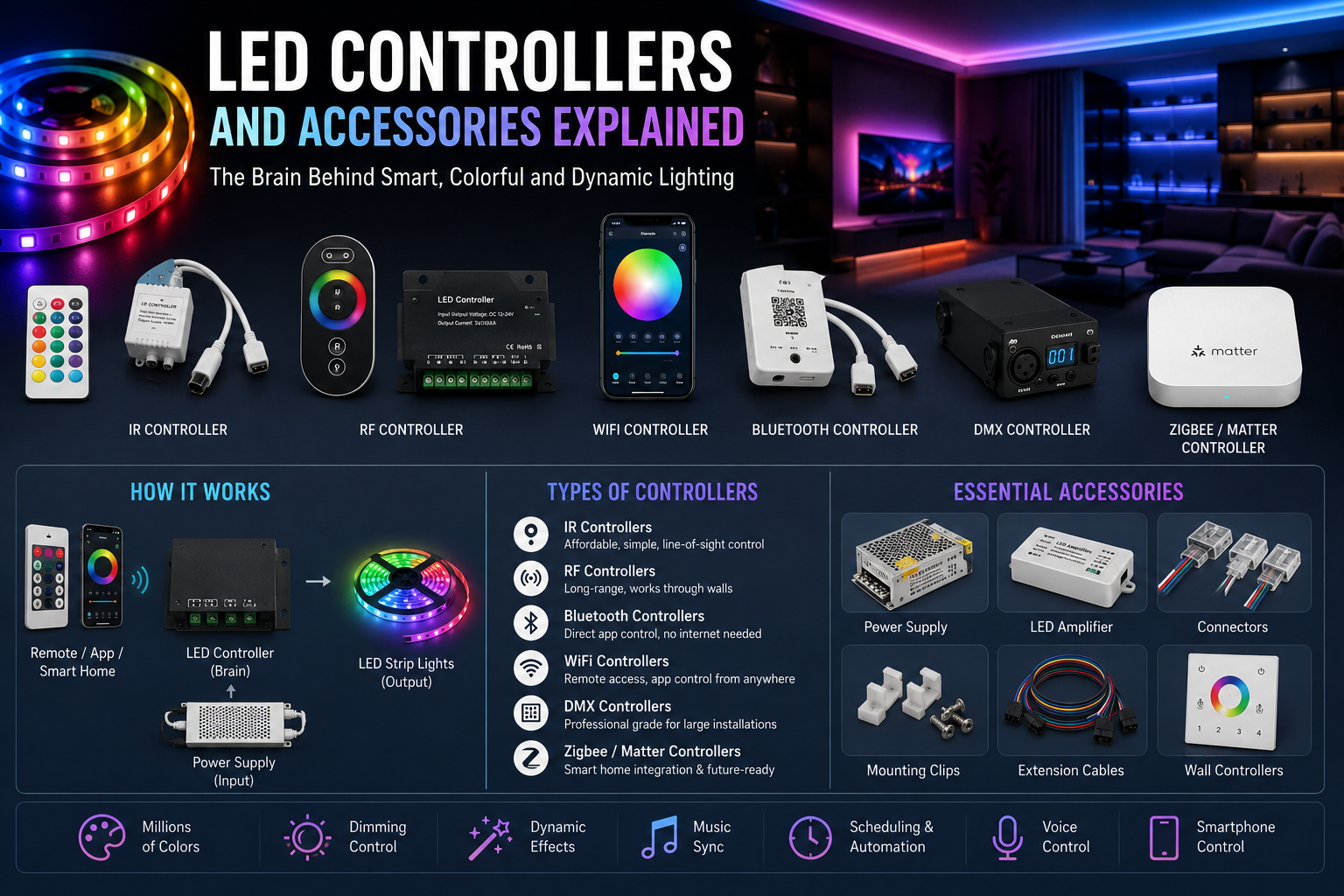
Modern LED lighting has evolved far beyond simply turning lights on and off. Today’s lighting systems allow homeowners, businesses, gamers, and event organizers to create immersive environments with millions of colors, dynamic lighting effects, automation, and voice control. At the center of every intelligent lighting system is the RGB LED controller. It acts as the brain of the installation, translating user commands into precise lighting effects while coordinating communication between the power supply, LED strips, remotes, and smart home platforms.
As smart homes continue to become more common, LED controllers have also become more advanced. Wireless communication, smartphone apps, cloud connectivity, Matter compatibility, voice assistants, and automation routines are now standard features in many modern products. Choosing the right controller is no longer just about changing colors—it’s about building a reliable lighting ecosystem that can grow with your home or business.
This guide explains everything you need to know about LED controllers, their accessories, different controller technologies, installation considerations, and practical buying advice. Whether you’re installing decorative strip lights in your bedroom, designing commercial accent lighting, or building an advanced smart home, understanding these components will help you make confident purchasing decisions.
What Is an RGB LED Controller?
An RGB LED controller is an electronic device designed to manage the color, brightness, lighting effects, and operating modes of RGB LED lighting systems. Instead of connecting LED strips directly to a power source, the controller sits between the power supply and the lights, acting as an intelligent command center. It receives instructions from a remote control, wall switch, smartphone app, or smart home hub and converts those commands into electrical signals that determine how the LEDs behave.
Without a controller, RGB LED strips would simply illuminate at a fixed output without offering color-changing capabilities or dynamic effects. The controller enables users to blend the red, green, and blue channels in different proportions, producing millions of unique color combinations. Advanced models can also synchronize multiple lighting zones, create schedules, respond to music, and integrate with home automation systems.
Modern controllers are available in wired and wireless configurations, with communication methods ranging from infrared and radio frequency to Bluetooth, WiFi, Zigbee, Matter, and professional DMX systems. The right choice depends on your installation size, desired features, and budget.
How an RGB LED Controller Works
An RGB controller functions by regulating the electrical signals sent to each LED color channel. Every RGB LED strip contains separate red, green, and blue LEDs arranged along the strip. The controller rapidly adjusts the power delivered to each channel using pulse-width modulation (PWM), a technique that changes brightness without wasting energy.
For example, if the controller supplies maximum power to the red channel while reducing the green and blue channels, the strip appears bright red. Mixing equal levels of all three channels creates white or neutral light on standard RGB strips. By continuously adjusting these output levels, the controller produces smooth fades, color transitions, flashing effects, breathing animations, and countless custom scenes.
Advanced smart LED controllers take this process even further by storing programmable scenes, synchronizing with music, responding to sensors, and communicating with cloud services. Some addressable LED controllers can even control every individual LED pixel independently, allowing animations that move across the strip in stunning visual patterns.
Signal Transmission
Signal transmission varies depending on the controller technology. Basic infrared controllers rely on direct line-of-sight communication between the handheld remote and the receiver. Radio-frequency controllers transmit signals through walls and furniture, making them far more convenient for everyday home use.
Bluetooth controllers establish direct communication with smartphones over short distances, making them ideal for portable lighting projects or installations without internet access. WiFi controllers connect to local networks, enabling remote operation from anywhere in the world through dedicated mobile applications.
Professional lighting environments often use DMX signal transmission, which allows hundreds of lighting fixtures to communicate over long cable runs with precise synchronization. Newer smart home controllers increasingly support Zigbee and Matter, improving interoperability between lighting products from different manufacturers and simplifying whole-home automation.
Why Controllers Are Necessary
Many first-time buyers wonder whether they actually need an LED controller. The answer depends on what they expect from their lighting system. If you only require a single fixed white light, a basic power supply may be sufficient. However, anyone who wants adjustable colors, dimming, lighting scenes, scheduling, voice control, or automation will require a compatible controller.
Controllers also improve safety and reliability by regulating electrical output according to the connected load. Proper controllers help prevent flickering, uneven brightness, communication failures, and compatibility issues between different lighting components. They simplify expansion as additional strips, amplifiers, or smart accessories can often be integrated into the existing system.
Rather than viewing the controller as an optional accessory, it’s better to think of it as the operating system of your LED lighting installation. Choosing the right controller at the beginning often determines how flexible and future-ready the entire system will be.
Types of RGB LED Controllers
Selecting the correct controller technology depends on your installation goals, operating distance, smart home requirements, and budget. Each controller type offers distinct advantages for different applications.
IR (Infrared) Controllers
Infrared controllers remain one of the most affordable solutions for residential LED strips. They communicate using infrared light, meaning the remote must point directly at the controller’s receiver. While this limitation may seem inconvenient, IR controllers remain popular because they are inexpensive, simple to install, and require virtually no setup.
They work well for televisions, bedroom accent lighting, shelving, display cabinets, and decorative installations where the controller remains visible. Their limited operating range and line-of-sight requirement make them less suitable for large rooms or concealed lighting installations.
Advantages
- Very affordable
- Easy installation
- Reliable for small projects
- Low power consumption
Limitations
- Requires direct line of sight
- Short operating distance
- Limited advanced features
Best Use Cases
- TV backlighting
- Bedroom LED strips
- Small decorative projects
RF (Radio Frequency) Controllers
Radio Frequency controllers solve many limitations associated with infrared systems. Because RF signals travel through furniture and walls, users enjoy much greater flexibility when controlling lighting from different rooms or concealed installations.
These controllers usually offer longer operating ranges, better responsiveness, and support for multiple lighting zones. Many premium RF controllers include elegant wall-mounted remotes, touch panels, and programmable scene buttons.
RF controllers are widely used in homes where convenience matters more than internet connectivity. Since they don’t depend on WiFi, they continue functioning even during network outages.
Bluetooth LED Controllers
Bluetooth controllers have become extremely popular thanks to smartphone integration. Instead of relying on handheld remotes, users simply install an app and pair their phone with the controller.
These systems are ideal for apartments, gaming setups, RVs, portable displays, exhibition booths, and temporary event lighting. Bluetooth provides quick setup without requiring routers or cloud accounts.
The primary limitation is operating distance. Most Bluetooth controllers function reliably within approximately 10 to 30 meters, depending on obstacles and device specifications.
WiFi LED Controllers
WiFi controllers represent one of the biggest advances in smart lighting technology. By connecting directly to a home’s wireless network, they enable remote access from virtually anywhere through cloud-connected mobile applications.
Many WiFi controllers integrate with Amazon Alexa, Google Assistant, Apple HomeKit, and other smart ecosystems. Users can schedule lighting routines, automate scenes, create timers, and monitor devices remotely.
For homeowners building connected living spaces, WiFi controllers offer an excellent balance between convenience, automation, and affordability.
Choosing between Bluetooth vs WiFi Color Changing LED Lights depends on how you plan to control and automate your lighting. Bluetooth offers simple direct control for smaller spaces, while WiFi enables remote access, smart home integration, and advanced automation features. Understanding the differences helps you select the best lighting setup for your needs.
Zigbee and Matter Controllers
Smart homes increasingly rely on universal communication standards rather than proprietary systems. Zigbee controllers have long been popular because they create reliable mesh networks that extend coverage throughout a property.
Matter is the newest smart home standard, designed to allow devices from different manufacturers to work together seamlessly. A Matter-compatible LED controller can often integrate across multiple ecosystems without locking users into a single brand.
Choosing controllers that support Matter helps future-proof new installations while improving compatibility as smart home technology continues to evolve.
DMX Controllers
DMX controllers are the professional choice for entertainment venues, theaters, concerts, architectural lighting, television studios, hotels, and commercial installations. Instead of controlling a single LED strip, DMX systems manage hundreds or even thousands of lighting fixtures simultaneously with exceptional timing precision.
Professional lighting designers rely on DMX because it allows synchronized animations, programmable lighting scenes, complex stage productions, and centralized management of large installations.
Although DMX systems require greater technical knowledge and higher initial investment, they remain the industry standard for professional lighting control.
RGB LED Controller Comparison
| Controller Type | Range | Remote Access | Voice Control | Best For | Cost |
| IR | Short | No | No | Small rooms | Low |
| RF | Medium-Long | No | Limited | Homes | Low-Medium |
| Bluetooth | 10–30 m | Local Only | Limited | Gaming & portable setups | Medium |
| WiFi | Internet | Yes | Yes | Smart homes | Medium |
| Zigbee/Matter | Whole home | Yes | Yes | Advanced automation | Medium-High |
| DMX | Very Long | Professional Systems | Optional | Commercial & stage lighting | High |
RGB vs RGBW vs Addressable LED Controllers
Not all LED controllers offer the same capabilities. While many people use the terms interchangeably, RGB, RGBW, and addressable LED controllers are designed for different lighting applications. Understanding these differences before purchasing can save both money and installation time.
A standard RGB LED controller is ideal for everyday decorative lighting. It controls the red, green, and blue channels together, allowing the entire strip to display one color or lighting effect at a time. This setup is perfect for bedrooms, kitchens, living rooms, TV backlighting, and retail displays where synchronized color changes are all that’s needed.
An RGBW controller adds a dedicated white LED channel alongside the traditional RGB channels. Instead of creating white by mixing red, green, and blue—which often results in a bluish or slightly tinted white—RGBW strips produce clean, bright white light suitable for task lighting, offices, kitchens, and commercial environments. Users can switch seamlessly between colorful decorative lighting and practical white illumination without sacrificing brightness or color accuracy.
Addressable LED controllers, often referred to as digital LED controllers, take customization to another level. Rather than controlling the entire strip as a single unit, they communicate with every individual LED or pixel. This enables flowing rainbow effects, chasing patterns, animated gradients, game synchronization, and complex visual displays. These controllers are popular among gamers, content creators, architectural lighting designers, entertainment venues, and DIY enthusiasts looking for advanced effects.
For users looking to control lighting more efficiently, learning How to Sync Multiple Color Changing LED Lights can help create seamless lighting scenes across multiple spaces. By syncing lights through apps or smart controls, you can achieve consistent colors, easier management, and a more immersive atmosphere throughout your setup.
RGB vs RGBW vs Addressable Controller Comparison
| Feature | RGB Controller | RGBW Controller | Addressable Controller |
| Color Control | Entire strip together | Entire strip together | Individual LEDs |
| White Light | Mixed RGB White | Dedicated Pure White | Depends on strip type |
| Individual Pixel Control | No | No | Yes |
| Installation Complexity | Easy | Moderate | Advanced |
| Programming Options | Basic | Moderate | Extensive |
| Typical Applications | Homes, Accent Lighting | Residential & Commercial | Gaming, Events, Displays |
| Cost | Low | Medium | Medium to High |
Which Controller Should You Choose?
If your goal is decorative ambient lighting, an RGB LED controller offers excellent value and easy installation. It covers most residential applications while remaining affordable.
Choose an RGBW controller if you want your LED strips to double as functional lighting. The dedicated white channel significantly improves lighting quality, making it suitable for kitchens, workspaces, hotels, and offices where true white illumination matters.
If you’re building a gaming room, stage setup, entertainment venue, or animated architectural display, an addressable LED controller is the clear winner. Although setup is more complex, the creative possibilities are almost limitless.
Essential LED Lighting Accessories
A high-quality LED controller performs best when paired with the right accessories. These supporting components improve safety, reliability, performance, and installation flexibility. Many lighting problems that users blame on controllers are actually caused by poor-quality accessories or incompatible components.
Power Supplies
The LED power supply provides stable voltage to both the controller and LED strips. Selecting the correct voltage—typically 5V, 12V, or 24V—is critical. An undersized power supply can cause flickering, overheating, and unexpected shutdowns, while an oversized unit generally operates more efficiently because it isn’t constantly running at full capacity.
Professional installers often recommend choosing a power supply with approximately 20% additional capacity above the calculated load. This safety margin helps improve long-term reliability while accommodating future expansion.
LED Drivers
Although many people confuse drivers with power supplies, they serve different purposes. LED drivers regulate current for LEDs that require constant-current operation, while standard LED strips typically use constant-voltage power supplies.
Commercial lighting systems frequently incorporate LED drivers to maintain consistent brightness, improve efficiency, and extend LED lifespan. Understanding which type your lighting requires prevents compatibility issues during installation.
Signal Amplifiers
Signal strength naturally decreases as LED strip length increases. A LED amplifier regenerates the control signal, allowing additional strip sections to display identical colors and effects without lag or brightness inconsistencies.
Amplifiers are especially useful in:
- Retail lighting
- Hotels
- Large living rooms
- Restaurants
- Commercial displays
- Long architectural lighting projects
Without amplifiers, long installations may suffer from delayed color changes or reduced brightness toward the end of the strip.
Dimmers
Although RGB controllers already provide brightness adjustment, standalone LED dimmers remain valuable for single-color lighting systems and specialized commercial applications.
Modern dimmers offer:
- Smooth brightness transitions
- Energy savings
- Extended LED lifespan
- Reduced glare
- Improved mood lighting
Many smart dimmers also integrate with automation systems for scheduled lighting adjustments throughout the day.
Splitters
Splitters simplify installations requiring multiple LED strips connected to one controller. Instead of running separate controllers for each branch, splitters distribute the signal while maintaining synchronized lighting effects.
They’re commonly used for:
- Ceiling coves
- Shelving
- Cabinet lighting
- Entertainment centers
- Retail displays
Proper splitter selection ensures signal integrity across every connected lighting section.
Extension Cables
Sometimes the controller cannot be mounted directly beside the LED strips. LED extension cables solve this problem by extending power and signal connections while maintaining reliable communication.
Using high-quality extension cables minimizes voltage drop, especially in larger installations. Cable gauge should always match the electrical load and installation distance.
Waterproof Connectors
Outdoor lighting demands additional protection. Waterproof connectors shield electrical connections from:
- Rain
- Moisture
- Dust
- Snow
- Humidity
- Corrosion
For patios, gardens, swimming pools, signage, and landscape lighting, waterproof accessories significantly improve system longevity and reduce maintenance requirements.
Mounting Channels
Aluminum mounting channels provide both mechanical protection and thermal management. Since LEDs generate heat during operation, aluminum channels help dissipate excess heat while protecting strips from accidental damage.
Additional benefits include:
- Cleaner installation
- Improved appearance
- Better light diffusion
- Extended LED lifespan
- Reduced dust accumulation
Professional installations almost always include aluminum channels for both aesthetics and durability.
Mounting Clips
Adhesive backing alone isn’t always enough, especially in humid environments or on textured surfaces. Mounting clips provide additional mechanical support that prevents LED strips from peeling away over time.
They’re inexpensive but greatly improve installation reliability for ceilings, outdoor areas, garages, workshops, and commercial buildings.
Corner Connectors
Sharp bends can damage LED strips or interrupt electrical continuity. Corner connectors allow installers to create clean 90-degree turns without cutting or stressing the strip.
They’re particularly useful for:
- Kitchen cabinets
- Display shelves
- Ceiling corners
- Furniture lighting
- Architectural features
These connectors simplify installation while maintaining professional-looking results.
How to Choose the Right RGB LED Controller
Selecting the right controller involves more than simply picking the cheapest option. Compatibility, performance, expandability, and smart features all play important roles in long-term satisfaction.
LED Strip Compatibility
Always verify that the controller supports your specific LED strip type. Standard RGB, RGBW, RGBCCT, and addressable LED strips each require different controller technologies.
Using an incompatible controller can result in incorrect colors, missing functions, or complete system failure.
Voltage Requirements (5V, 12V, 24V)
Voltage compatibility is one of the most important purchasing considerations.
- 5V is commonly used for addressable LED strips.
- 12V suits most residential decorative lighting.
- 24V performs better for longer installations because it reduces voltage drop.
Never mix different voltages unless the manufacturer explicitly supports it.
Maximum Load Capacity
Every controller has a maximum wattage rating. Calculate your total LED load before purchasing.
For example:
- LED Strip Power = 14.4W per meter
- Strip Length = 5 meters
Total Load:
14.4 × 5 = 72 Watts
Your controller and power supply should comfortably support more than this value.
Number of Lighting Zones
Some controllers operate a single lighting zone, while premium models independently control multiple rooms or lighting areas.
Multi-zone controllers are ideal for:
- Open-plan homes
- Hotels
- Restaurants
- Offices
- Commercial buildings
They provide centralized management without installing multiple independent systems.
Connectivity Requirements
Think about how you’ll interact with the lighting every day.
Options include:
- Handheld remote
- Smartphone app
- Wall switch
- Bluetooth
- WiFi
- Zigbee
- Matter
- DMX
Choose the control method that best matches your lifestyle and future expansion plans.
Smart Home Compatibility
If you’re building a connected home, verify compatibility with your preferred smart ecosystem.
Popular integrations include:
- Amazon Alexa
- Google Assistant
- Apple HomeKit
- SmartThings
- Home Assistant
- Matter
Future-proof compatibility prevents expensive upgrades later.
Indoor vs Outdoor Installation
Outdoor installations require weather-resistant controllers and waterproof connectors. Always verify the controller’s IP rating before installation.
Indoor controllers generally prioritize aesthetics and smart features, while outdoor models focus on environmental durability.
Installing color changing LED strip lights is a simple way to upgrade any space with dynamic and customizable lighting. From measuring and surface preparation to connecting the power supply and controls, proper installation ensures the best performance and appearance. Learn How to Install Color Changing LED Strip Lights for a smooth and professional setup.
Budget Considerations
The lowest-priced controller isn’t always the best value. Spending slightly more often provides:
- Better wireless range
- Improved build quality
- Reliable firmware updates
- Higher load capacity
- Better customer support
- Longer product lifespan
A quality controller usually becomes the foundation of your lighting system for many years.
Controller Selection Checklist
Use this checklist before purchasing:
✔ Compatible with your LED strip type
✔ Correct operating voltage (5V, 12V, or 24V)
✔ Sufficient maximum load capacity
✔ Supports desired wireless technology
✔ Compatible with your smart home ecosystem
✔ Allows future expansion
✔ Suitable for indoor or outdoor use
✔ Includes warranty and firmware support
✔ Reliable mobile application
✔ Positive customer reviews
Smart Features to Look For
Modern smart LED controllers offer far more than simple on/off functionality. As smart home technology continues to evolve, today’s controllers provide advanced automation, remote management, and personalized lighting experiences that improve both convenience and energy efficiency. Whether you’re upgrading a gaming room, installing architectural lighting, or automating an entire home, choosing a controller with the right smart features ensures your lighting system remains useful for years to come.
Mobile App Control
A dedicated smartphone app is one of the most valuable features of a modern RGB lighting controller. Instead of searching for a remote, users can control brightness, colors, effects, timers, and multiple lighting zones directly from their phone or tablet.
Most mobile apps also allow users to save favorite lighting scenes, create custom color palettes, and group several controllers together. Some advanced applications even display energy usage statistics and provide firmware update notifications, making maintenance much easier.
Voice Assistant Integration
Voice control has become an expected feature in modern smart homes. Many WiFi LED controllers support integration with popular voice assistants, allowing users to operate lighting without touching a switch or smartphone.
Common voice commands include:
- Turn lights on or off
- Change colors
- Adjust brightness
- Activate movie mode
- Start gaming mode
- Set bedtime lighting
- Control individual rooms
Voice automation is especially useful in kitchens, living rooms, offices, and accessibility-focused installations where hands-free operation adds convenience.
Scheduling and Automation
Scheduling allows lighting to operate automatically throughout the day. Users can configure routines such as turning lights on at sunset, dimming them before bedtime, or switching decorative lighting on during holidays.
Automation can also work alongside sensors, enabling lights to respond to occupancy, daylight levels, or security events. These features improve energy efficiency while enhancing comfort and safety.
Custom Lighting Scenes
Most premium controllers let users create personalized scenes for different activities. Rather than adjusting colors manually each time, a single tap can activate predefined settings.
Popular scene examples include:
- Movie Night
- Reading
- Relaxation
- Party Mode
- Gaming Setup
- Romantic Dinner
- Holiday Decorations
Scenes can also be scheduled or linked to voice commands for seamless operation.
Music Synchronization
Music sync has become one of the most requested smart lighting features. Built-in microphones or app-based audio analysis allow the controller to synchronize colors and effects with music, creating an immersive entertainment experience.
This feature is especially popular for:
- Gaming rooms
- Home theaters
- Parties
- Live streaming setups
- Event lighting
- Dance floors
Firmware Updates
A controller that supports firmware updates continues improving long after purchase. Manufacturers regularly release updates that fix bugs, improve security, add compatibility with new smart home platforms, and introduce additional lighting effects.
Choosing products with active software support extends the useful life of the entire lighting system.
Group Control
Large homes and commercial installations often contain multiple controllers. Group control allows several controllers to operate together while still supporting independent room control.
For example:
- Entire home lighting
- Upstairs and downstairs groups
- Restaurant dining areas
- Retail display sections
- Hotel corridors
- Office floors
This centralized management greatly simplifies daily operation.
Installing an RGB LED Controller
Installing an RGB LED controller is generally straightforward when compatible components are selected. Careful planning and correct wiring improve both safety and long-term reliability.
Step 1: Verify Compatibility
Before installation, confirm that the controller supports your LED strip type, voltage, and lighting technology. Check whether you’re using RGB, RGBW, RGBCCT, or addressable LEDs.
Review the controller’s maximum power rating and ensure it exceeds the total wattage of the connected strips.
Step 2: Select the Correct Power Supply
Choose a regulated power supply that matches both the voltage and power requirements of the LED strips.
A good practice is to leave approximately 20% spare capacity to reduce heat generation and improve reliability.
Step 3: Connect the Controller
Connect the power supply to the controller’s input terminals while observing correct polarity.
Most controllers clearly label:
- Positive (+)
- Negative (-)
- RGB outputs
- Data terminals (for addressable LEDs)
Double-check every connection before applying power.
Step 4: Wire the LED Strips
Connect the LED strip outputs to the controller according to the manufacturer’s wiring diagram.
Ensure:
- Polarity is correct.
- Connectors are firmly attached.
- No exposed conductors can cause short circuits.
- Cable lengths remain within recommended limits.
Step 5: Pair the Remote or Mobile App
If using Bluetooth or WiFi, download the recommended application and follow the pairing instructions.
For RF or IR controllers, install batteries in the remote and test communication before mounting components permanently.
Step 6: Configure Scenes and Automation
After successful pairing, customize lighting preferences.
Configure:
- Favorite colors
- Brightness levels
- Timers
- Voice assistant integration
- Automation routines
- Multi-room groups
Saving these settings now simplifies future operation.
Step 7: Test the Complete System
Before completing installation, verify:
- Every color displays correctly.
- Brightness changes smoothly.
- Wireless communication is stable.
- Smart home integration works.
- All connected LED strips respond simultaneously.
Testing now prevents unnecessary troubleshooting later.
Installation Checklist
✔ Verify controller compatibility
✔ Confirm operating voltage
✔ Calculate total wattage
✔ Select suitable power supply
✔ Check polarity before powering on
✔ Secure all connectors
✔ Test every lighting mode
✔ Pair remote or mobile application
✔ Configure automation
✔ Mount cables neatly and safely
Troubleshooting Common RGB LED Controller Problems
Even high-quality controllers occasionally experience problems. Most issues can be solved without replacing hardware.
Controller Not Powering On
Possible causes include:
- Incorrect voltage
- Loose wiring
- Blown fuse
- Faulty power supply
Solution:
Check input voltage using a multimeter, inspect every connection, and verify that the power supply is functioning correctly.
Lights Not Responding
If the controller powers on but the LEDs remain off:
- Confirm cable polarity.
- Check connector alignment.
- Verify strip compatibility.
- Reset the controller if necessary.
Testing with a short LED strip section can help isolate the problem.
Incorrect Colors
Wrong colors usually indicate wiring errors.
For example:
- Red displaying as blue
- Green missing
- White appearing pink
Inspect RGB channel connections and ensure the controller is configured for the correct strip type.
Flickering LEDs
Flickering commonly results from:
- Undersized power supplies
- Loose connectors
- Voltage drop
- Electrical interference
- Low-quality components
Replacing poor-quality accessories often solves persistent flickering.
WiFi or Bluetooth Connection Issues
If wireless communication fails:
- Restart the controller.
- Reboot the router.
- Move closer for Bluetooth pairing.
- Update firmware.
- Verify WiFi frequency compatibility.
- Reset network settings if required.
Voice Assistant Not Detecting the Controller
If Alexa, Google Assistant, or another platform cannot discover the controller:
- Confirm account linking.
- Verify cloud synchronization.
- Update firmware.
- Ensure the controller supports the selected ecosystem.
- Restart both the controller and smart speaker.
Troubleshooting Checklist
✔ Verify power supply output
✔ Check wiring polarity
✔ Inspect connectors
✔ Confirm controller compatibility
✔ Update firmware
✔ Restart controller
✔ Re-pair mobile app
✔ Test with shorter cable lengths
✔ Verify wireless network settings
✔ Reset controller if necessary
Common Mistakes to Avoid
Many installation issues can be prevented with proper planning.
Avoid these common mistakes:
- Purchasing an incompatible controller for the LED strip.
- Mixing 5V, 12V, and 24V components.
- Overloading the controller beyond its rated capacity.
- Using low-quality or undersized power supplies.
- Ignoring waterproof requirements for outdoor installations.
- Poor cable management that increases maintenance difficulty.
- Using excessively long cable runs without amplifiers.
- Mixing incompatible smart home ecosystems.
- Skipping firmware updates.
- Buying products solely based on price instead of quality and compatibility.
Professional installers recommend investing in reliable controllers and certified power supplies because these components determine the stability of the entire lighting system.
Conclusion
Choosing the right RGB LED controller is one of the most important decisions when building a reliable lighting system. While LED strips provide the visual effect, the controller determines how those lights perform, respond, and integrate with modern smart home technology.
Whether you’re installing decorative lighting in a bedroom, creating immersive gaming environments, upgrading commercial displays, or designing professional architectural lighting, selecting compatible controllers and quality accessories improves safety, reliability, and long-term performance. Features such as WiFi connectivity, Matter compatibility, voice control, automation, and mobile app management provide flexibility that can easily adapt to future technology.
Frequently Asked Questions
1. What is an RGB LED controller?
An RGB LED controller manages the color, brightness, and lighting effects of RGB LED strips.
2. Do I need a controller for LED strip lights?
Yes, if you want color changing, dimming, lighting scenes, or smart control.
3. What is the difference between RGB and RGBW controllers?
RGBW controllers include an additional dedicated white LED channel for higher-quality white lighting.
4. Can one controller operate multiple LED strips?
Yes, provided the total load remains within the controller’s rated capacity or signal amplifiers are used.
5. What voltage controller do I need?
Choose a controller that matches your LED strip voltage—typically 5V, 12V, or 24V.
6. Are WiFi controllers better than Bluetooth controllers?
WiFi controllers offer remote access and smart home integration, while Bluetooth controllers are simpler for local control.
7. What is a DMX LED controller?
A DMX controller is a professional lighting control system used in entertainment, commercial, and architectural applications.
8. Can I use Alexa or Google Assistant with an RGB controller?
Yes, many WiFi and Matter-compatible controllers support voice assistants.
9. Why are my LED lights showing the wrong colors?
Incorrect wiring, controller configuration, or incompatible LED strips are common causes.
10. Can I use one controller for multiple rooms?
Yes, multi-zone controllers are specifically designed for this purpose.
11. What is an addressable LED controller?
It controls each LED individually, allowing complex animations and dynamic lighting effects.
12. How long do LED controllers last?
A quality controller can typically last 5–10 years or more with proper installation and adequate cooling.
13. Can I install an RGB LED controller myself?
Yes, many residential systems are DIY-friendly if you follow the manufacturer’s wiring instructions.
14. Do smart LED controllers require the internet?
Not always. Bluetooth controllers work locally, while WiFi features such as remote access require an internet connection.
15. Can I upgrade my existing LED strips with a smart controller?
In many cases, yes, as long as the controller is compatible with the strip type and operating voltage.